
A lead who does not hear back within minutes rarely waits around.
An automated lead follow-up system is software that responds to, nurtures, and qualifies new leads the moment they show interest, without a rep touching a keyboard.
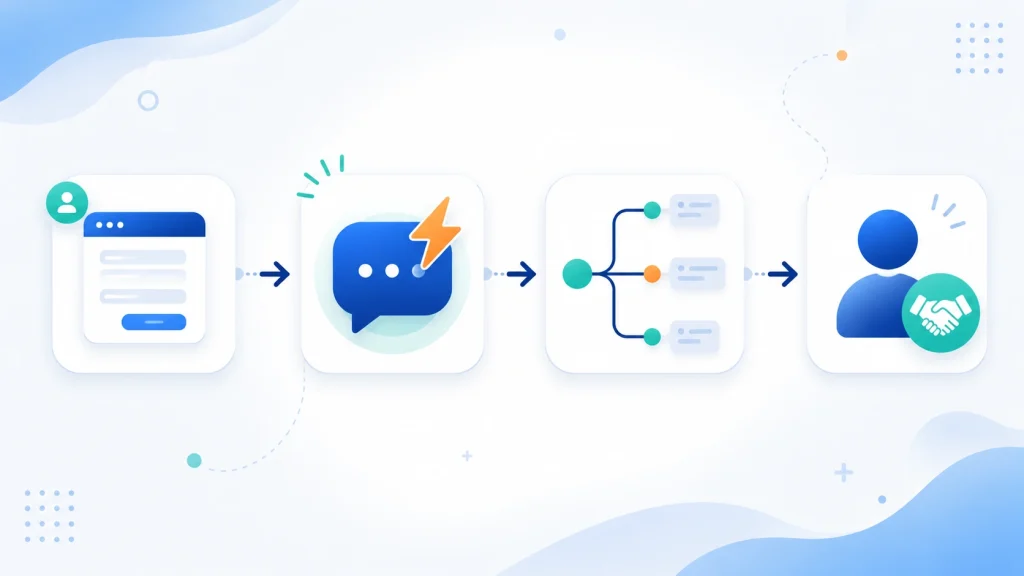
It runs on one simple logic: a trigger event starts the process, an instant response acknowledges the lead within seconds, a nurture sequence keeps the conversation going over days or weeks, and a human handoff brings in a sales rep the second the lead is ready to buy.
At an n8n automation agency built for small business follow-up systems, we build this exact structure for small businesses that cannot afford to lose a lead to slow follow-up.
This guide walks through how the system works and how to build your own.
What This System Actually Is (and How It Thinks)
An automated lead follow-up system replaces guesswork with a repeatable process. It follows a fixed sequence, trigger, instant response, nurture, human handoff, and it runs the same way for every single lead.
A trigger can be a form fill, a missed phone call, or a visit to your pricing page.
The instant response goes out within seconds, not hours. The nurture phase carries the conversation forward with timed messages until the lead is ready to talk to a person, and that is when automation steps back and a rep takes over.
This structure treats follow-up as infrastructure rather than a task someone might forget.
Once it is built, it runs at 9 AM on a Tuesday and at midnight on a Saturday, catching leads that would otherwise sit untouched.
Why Manual Follow-Up Fails (The Real Cost)
Most people assume reps just forget to follow up.
The real problem is context switching. Every time a rep stops what they are doing to open the CRM, remember which of a dozen leads needs attention, recall what was last said, and decide what to send next, they lose momentum.
That friction adds up across a full pipeline, and leads go cold quietly.
Speed matters more than most sales teams realize. According to a 2026 Optifai study of 939 B2B companies, leads contacted within 5 minutes are up to 21 times more likely to qualify than leads contacted after 30 minutes. Separate research from Chili Piper found that replying in under 1 minute can lift conversion rates by as much as 391 percent compared to slower response windows.
\RAIN Group research also found it takes an average of 8 touches just to book a first meeting, a pace that is nearly impossible to keep up by hand across dozens of active leads.
Note: A rep juggling 40 active leads, each needing 5 touches, is managing 200 separate follow-up actions with perfect timing and zero mistakes.
That is not a discipline problem. It is a structural one, and it explains why even organized sales teams still lose leads to silence.
How the System Works (The Core Logic)
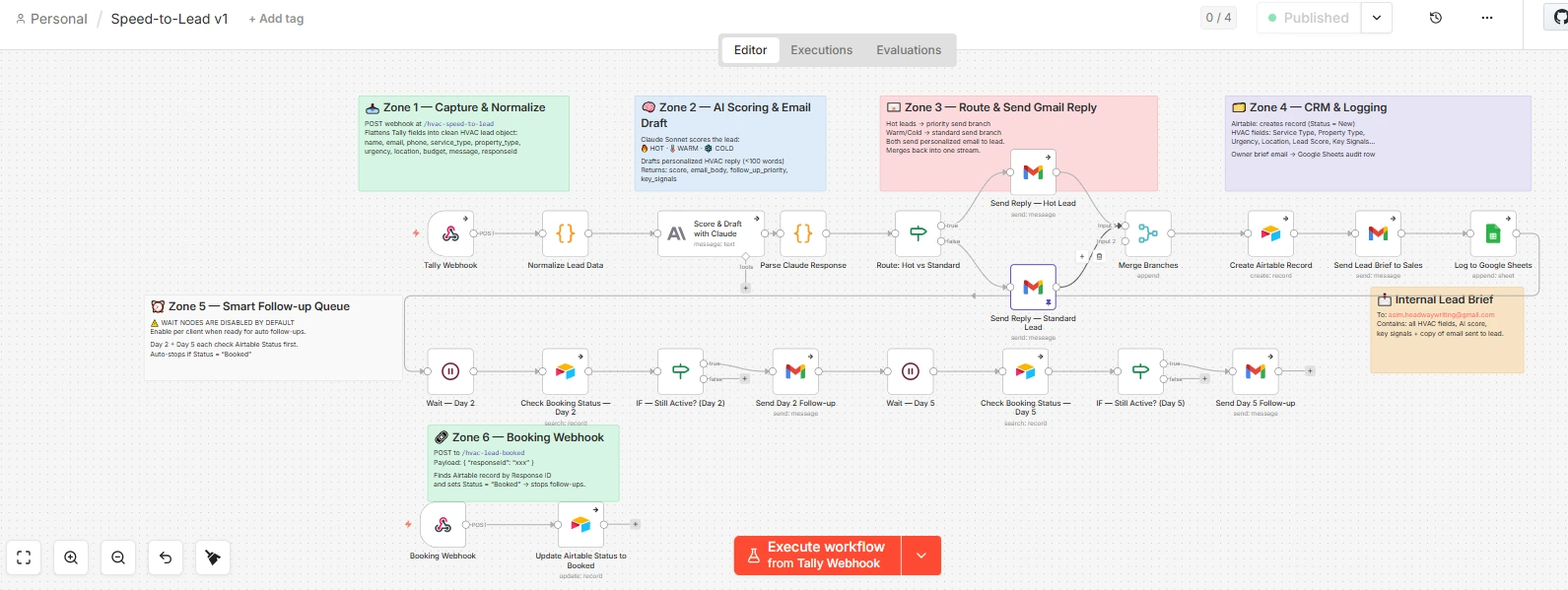
A well-built system runs through six steps that cover the full lead lifecycle.
- Trigger – a defined event activates the system, such as a form fill or missed call
- Capture and enrich – the lead’s data is captured and AI adds behavioral or firmographic context
- Instant response – a personalized acknowledgment goes out within 60 seconds
- Behavioral scoring – the system scores the lead based on engagement signals
- Branching nurture – multi-touch sequences adapt based on how the lead behaves
- Human handoff – a rep gets alerted the moment the lead crosses a qualifying threshold
The flow looks like this: lead event, CRM capture, instant message, score, branch sequence, handoff alert.
The Trigger (What Starts It)
The trigger is the exact moment the system switches on. The most common triggers include:
- Web form submission, such as a contact request or demo booking
- Pricing page visit, tracked through a pixel or session tool
- Missed call, the number one silent killer of leads for local service businesses
- Quote request, common in e-commerce and service checkout flows
- Dormant lead re-engagement, triggered after 30, 60, or 90 days of inactivity
- Cold outbound reply, when a prospect responds to an email campaign
Each trigger should map to a specific goal. Treating every trigger the same way is one of the fastest ways to weaken results.
Instant Response (Speed-to-Lead)
Speed-to-lead is the single highest-leverage variable in the whole funnel.
| Response Time | Conversion Impact |
| Under 1 minute | Up to 391% higher conversion rate |
| Within 5 minutes (vs 30 minutes) | Up to 21x more likely to qualify the lead |
| After 30 minutes | Roughly 80% of the speed-to-lead advantage is already gone |
An effective instant response message does three things. It acknowledges the specific inquiry, sets a clear expectation for next steps, and delivers one piece of immediate value, whether that is a resource, a booking link, or a direct answer.
Lead Qualification and Scoring
This is where most automated systems quietly break.
Qualification logic should live inside your CRM, not bolted onto a separate scoring tool. When scoring data sits outside your CRM, it creates a sync blind spot.
A lead might get flagged “hot” in the scoring tool while the CRM still shows them as brand new, and nobody gets the alert.
Important: Effective scoring models track signals like email opens, link clicks, pricing page revisits, reply sentiment, and time spent on key pages.
Leads with three or more touchpoints plus a pricing page visit get escalated to a human. Lower-score leads stay in the automated sequence until they show stronger intent.
Nurture Sequence and Branching Logic
Static drip campaigns that send the same five emails to everyone are outdated. Modern lead nurture sequences branch based on what a lead does, or does not do.
| Trigger Event | Wait Period | Next Action |
| No reply after initial message | 2 to 3 days | Send a value-add resource such as a case study |
| Pricing page revisit | Immediate | High-priority alert sent to the sales rep |
| Positive reply received | Immediate | Pause automation and route to a human |
| No engagement after 3 touches | 7 days | Send a low-pressure re-engagement message |
| Cold lead, 30+ days silent | 30, 60, or 90 days | Re-engagement loop with a new angle |
Human Handoff
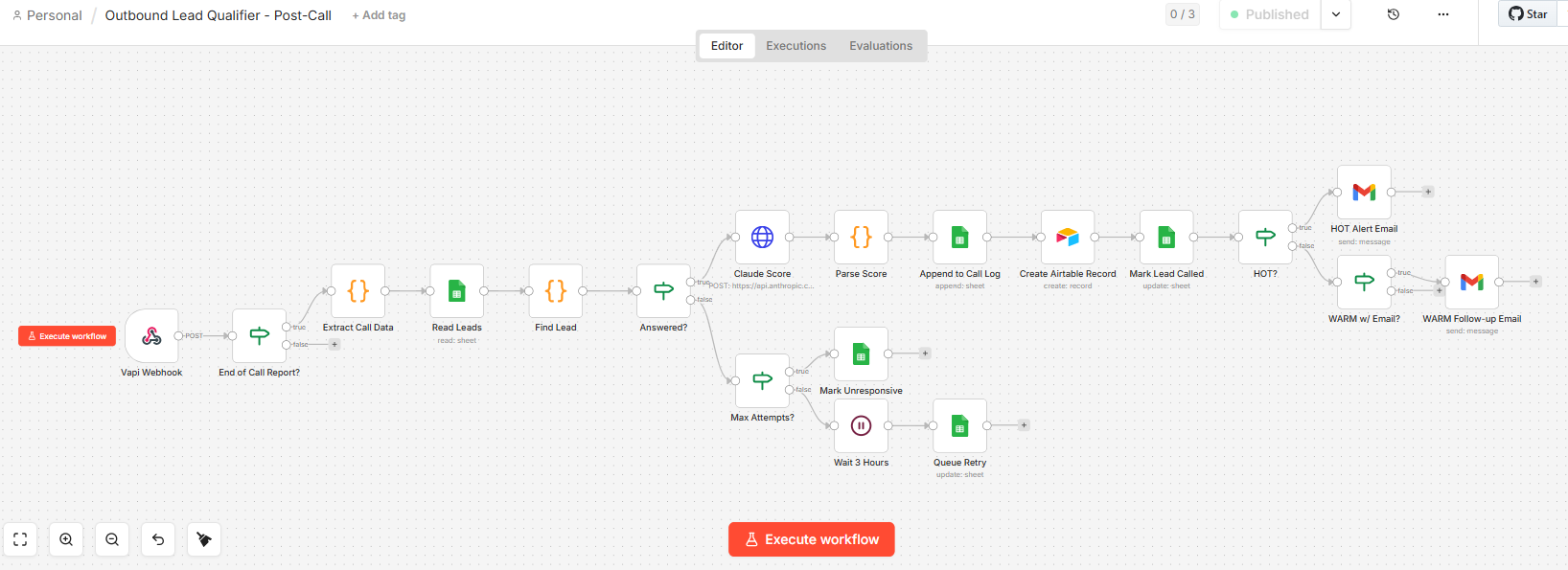
Automation should stop, and a rep should get alerted, the moment a lead replies positively, books a call, hits a high qualification score, or raises an objection a template cannot answer.
The handoff notification needs full context: lead source, every message sent, engagement history, and current score.
Watch out: a rep walking into a conversation cold, despite an automated history already existing, undoes the trust the system just built.
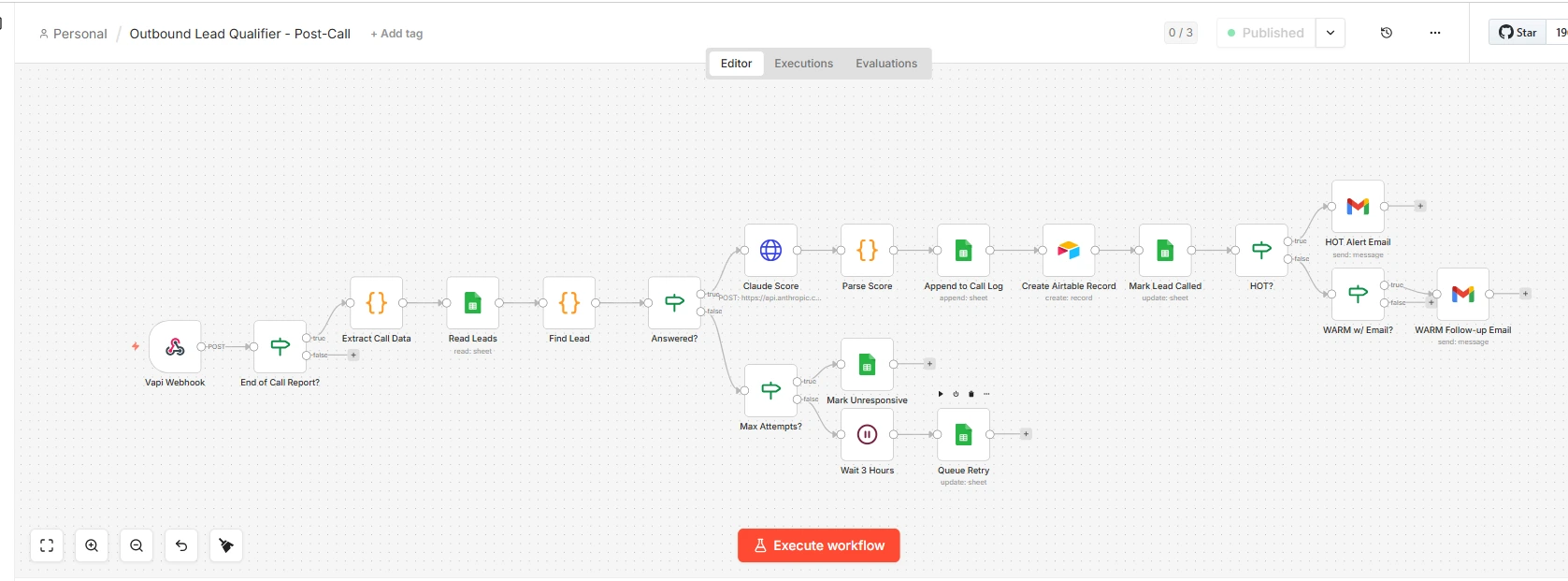
Automated vs Manual Follow-Up Side-by-Side
The gap between the two comes down to speed and consistency.
Automated follow-up responds in seconds and never misses a touch, while manual follow-up depends on a rep remembering to act and having the time to do it.
| Dimension | Automated | Manual |
| Speed | Response in under 60 seconds, 24/7 | Depends on rep availability, typically hours |
| Consistency | Every lead gets every touch, every time | Inconsistent, often drops off after 1 to 2 attempts |
| Effort | A few hours to build, near-zero ongoing effort | 30 to 45 minutes per day per rep, per pipeline |
| Personalization | AI-driven dynamic personalization at scale | High quality but not scalable |
| Cost at scale | Fixed platform cost regardless of lead volume | Cost grows with more leads and headcount |
More companies now treat automated follow-up as a baseline requirement, not an advanced tactic.
As ad costs climb and organic lead volume gets harder to predict, businesses that convert the highest share of the leads they already have tend to outperform competitors who simply spend more on acquisition.
This has pushed automated follow-up into core go-to-market infrastructure, especially for small teams that cannot afford a large sales development headcount but still need consistent coverage across every inbound channel.
This shift also explains why platforms like n8n have grown fast among small and mid-sized businesses.
They let one person, often a marketing lead or owner, build and maintain a system that used to require a full revenue operations team.
The barrier to entry has dropped, but the strategic thinking behind trigger mapping, sequence design, and handoff rules still decides whether the system actually performs.
How to Build Your Own Follow-Up Engine (Step-by-Step)
Step 1. Choose Your Stack (CRM and Automation Tool)
Your tool choice should match your business model, not the hype around any single platform.
| Tool | Best For | Key Strength | Starting Price |
| GoHighLevel | SMB, local service, agencies | All-in-one CRM, SMS, email, and missed-call text-back | Around $97/month |
| HubSpot | B2B SaaS, mid-market | Deep CRM with native lead scoring and a strong free tier | Free tier, paid from ~$20/month |
| Pipedrive | Sales-focused SMB | Clean pipeline visualization with solid automations | From ~$15/user/month |
| Apollo.io | B2B outbound and SDR teams | Prospecting and sequencing combined in one tool | Free tier, paid from ~$49/month |
| Artisan | AI-native outbound teams | Fully autonomous AI SDR | Custom pricing |
| n8n, Make, or Zapier | Technical teams, custom workflows | Flexible layer connecting tools via automation | Free to ~$29/month |
As a rule of thumb, local and home service businesses tend to do best on GoHighLevel, B2B SaaS companies with inbound leads lean toward HubSpot, B2B outbound teams benefit from Apollo, and businesses needing custom logic across multiple tools should work with an experienced n8n automation agency that can design workflows for messier, real-world lead flows instead of generic templates.
For a deeper look at cost differences between the flexible automation options, this n8n vs Zapier cost comparison is worth reading before you commit to a stack.
Step 2. Map Your Triggers and Goals
Before building anything, define what events matter and what outcome each one should drive.
- Web form fill, goal is booking a discovery call
- Missed phone call, goal is recovering the lead via SMS within 10 seconds
- Pricing page visit, goal is alerting a rep and sending a targeted email
- Abandoned quote request, goal is re-engaging within 5 minutes
- Dormant lead inactive for 30+ days, goal is re-engaging with a new offer angle
- Positive reply to a nurture email, goal is routing to a rep immediately
Each trigger needs one clear goal and one defined sequence. Building a single catch-all sequence for every trigger type is one of the most common mistakes in this kind of build.
Step 3. Build Your Sequence (Messaging and Timing)
A proven follow-up structure for most businesses looks like this.
Day 0, an instant acknowledgment within 60 seconds that references the specific inquiry and sets expectations.
Day 1 to 2, a value message such as a relevant case study or short story showing how a similar problem got solved.
Day 3 to 5, a low-friction check-in confirming the resource was helpful and offering to answer questions.
Day 6 to 7, a social proof message with a specific result achieved for a comparable client.
Day 8 to 10, a soft close asking if the timing still makes sense.
Stop-on-reply logic matters most here. The moment a lead responds at any point, automation pauses immediately and the conversation routes to a human.
Try This: “Hi, thanks for reaching out about [service]. I’m looking into this now and will follow up within a few hours. In the meantime, here’s a quick resource that might help.”
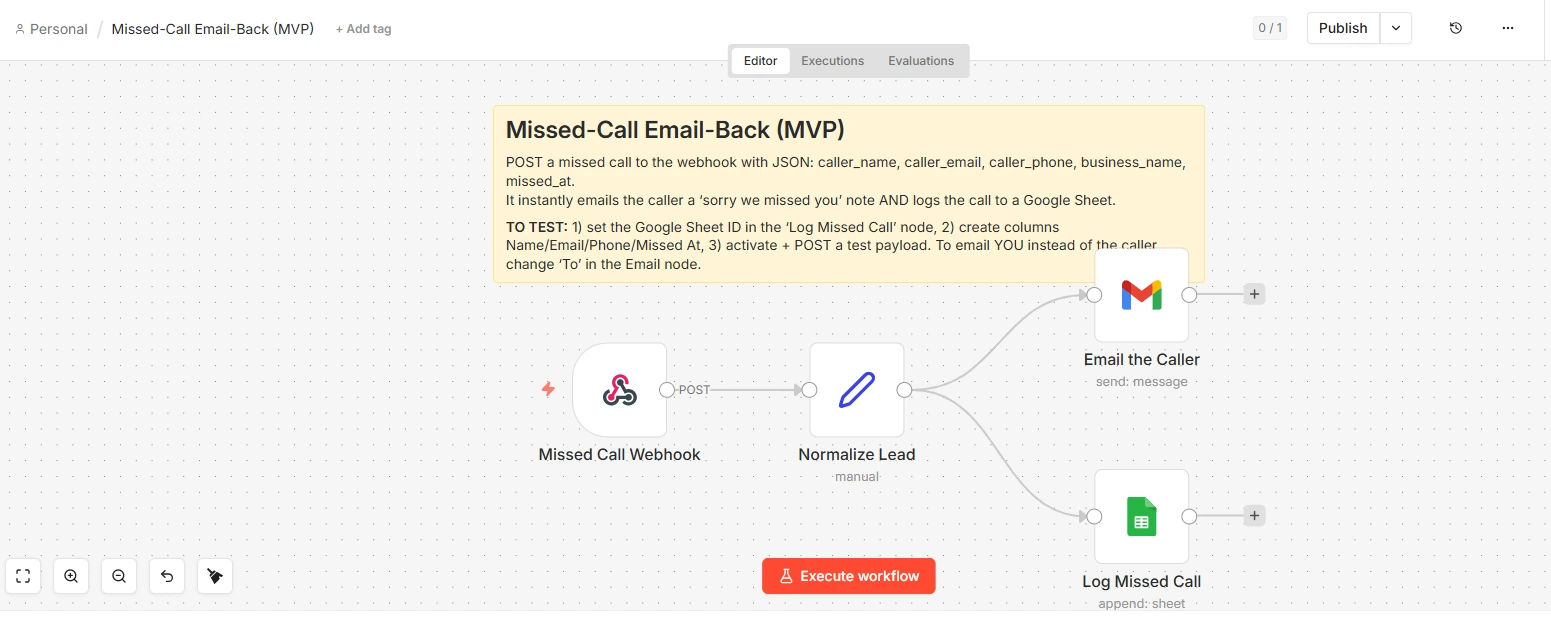
Step 4. Add the Missed-Call Text-Back Layer
This is the most overlooked piece in almost every B2B-focused guide, yet it is one of the highest-return automations for local businesses, contractors, and home service providers that run on inbound phone calls.
When a business misses a call, most of those callers never call back.
They call someone else instead. A missed-call text-back system fires an automated text within about 10 seconds of a missed call, something like “Sorry we missed your call! What can we help you with today?” From there, an AI conversation engine qualifies the caller, gathers their needs, and books them straight into the calendar without a human touching the interaction.
Some automation providers report businesses recovering 20 to 30 percent more bookings from missed-call recovery, though this figure comes from vendor data rather than independent research.
Step 5. Personalize With AI Beyond First-Name Tags
Static personalization, dropping in a first name and company, is table stakes now. Dynamic AI personalization goes further.
Form data personalization references the exact service or problem a lead mentioned when they submitted their form.
Behavioral personalization shifts the next message to address pricing directly once a lead visits your pricing page, instead of sending a generic greeting.
Industry or role personalization uses enrichment tools to reference a lead’s vertical or specific role. Sentiment-adaptive branching lets AI read whether a reply is positive, neutral, or negative and adjust the next step accordingly.
The goal is for every automated message to read as though someone who already knows exactly where the lead stands wrote it personally.
Step 6. Test, Launch, and Set Handoff Rules
Before going live, run through this checklist.
- All triggers are mapped and tested using dummy leads
- CRM and automation tool sync in real time, not on a batch schedule
- Opt-out and unsubscribe logic is built into both SMS and email sequences
- Stop-on-reply logic is confirmed active across every sequence
- Handoff rules are clearly defined by score, action, or keyword
- Rep notification templates include lead name, source, message history, and score
- Timezone logic is set so messages never fire at inappropriate hours
- The full sequence has been tested end to end before launch
Step 7. Monitor, A/B Test, and Improve
An automated system is never finished. Track these metrics weekly.
- Reply rate for cold outbound typically runs 5 to 7 percent, climbing to as high as 17 percent with strong personalization, while warm inbound stays in the 30 percent or higher range
- Open rate varies by email type, cold outbound averages 15 to 40 percent (inflated by Apple Mail Privacy Protection), while transactional or opt-in email runs closer to 40 to 60 percent
- Meeting booked rate tracks how many leads from each sequence convert to a call
- Speed-to-first-response confirms the system is consistently hitting under 60 seconds
- Handoff-to-close rate measures whether escalated leads are actually worth a rep’s time
- Sequence drop-off point identifies which message causes the most unsubscribes
Recommended: test one variable at a time, whether that is subject line, send time, message length, or call to action.
Common Mistakes That Break Automated Follow-Up Systems
- Qualification logic living outside the CRM, which creates a hot-lead blind spot where a lead flagged as ready in one tool still shows as brand new elsewhere
- Sync schedule blind spots, where batch syncing between a form tool and CRM delays lead visibility by hours and kills any speed-to-lead advantage
- Automating before knowing what is broken, since layering automation on top of a flawed manual process only amplifies the failure at scale
- Treating automation as the strategy itself, when it is really just a delivery layer that cannot fix a weak offer or an undefined ideal customer profile
- Using one sequence for every lead type, which ignores that a cold outbound lead and a warm inbound form fill send completely different buying signals
- Skipping a human-in-the-loop failsafe, which lets automation keep running past the exact moment a lead wanted to talk to a person
Real-World Examples: 4 Automated Follow-Up Sequences in Action
These four sequences show the trigger, timing, and handoff logic in practice across the most common lead types. Each one follows the same core rule: automation runs until a lead engages, then a human takes over.
Web Form to Email to Call.
A form gets submitted and an instant personalized email and SMS go out within 60 seconds. If there’s no reply, a value email follows on day 2, a check-in message on day 4, and a rep gets auto-assigned for a call by day 6.
The moment the call connects, automation pauses and the interaction logs to the CRM.
Pricing Page Visit to Behavior Email.
A page visit lasting three or more minutes triggers an immediate rep alert plus a behavior-based email. If the email is opened but not answered, a follow-up asks whether they had a chance to review pricing.
If it’s clicked but still unanswered, the lead gets a high-score flag and a rep call task.
Cold Outbound to Multi-Channel.
A personalized cold email goes out with an industry-specific angle on day 0.
A LinkedIn connection request follows on day 2 if integrated, a follow-up email with social proof lands on day 4, a call attempt happens on day 7, and a soft break-up message closes the sequence on day 10.
Dormant Lead Re-Engagement.
After 30 days of no activity, a re-engagement email introduces a new offer or update. If there’s no reply, a second email on day 45 asks if the need is still a priority.
A final email on day 60 offers to close the file unless they want to stay connected. Any reply at any point routes immediately to a rep.
Popular Lead Follow-Up Tools Compared
The right tool depends on your lead volume and how much customization you need. Some platforms work out of the box for small teams, while others require a build to fit a specific sales process.
| Tool | Type | Best For | AI Feature | Starting Price |
| GoHighLevel | CRM-native, SMS/email first | SMB, local service, agencies | AI voice and missed-call text-back | Around $97/month |
| HubSpot | CRM-native | B2B SaaS, mid-market | AI scoring and smart send timing | Free tier, paid from ~$20/month |
| Pipedrive | CRM plus pipeline | Sales-focused SMB | AI assist and workflow automations | From ~$15/user/month |
| Apollo.io | Outbound sequencing | B2B SDR and outbound teams | AI email writing and intent data | Free tier, paid from ~$49/month |
| Artisan (Ava) | AI-native SDR | Fully autonomous outbound | Autonomous AI SDR | Custom pricing |
| Thoughtly | AI-voice-first | Voice-based lead qualification | AI phone calls | Custom pricing |
| Conversica | AI conversational | Enterprise lead nurturing | Autonomous AI rep | Enterprise pricing |
| Verse.io | SMS-first | Local/SMB lead qualification | AI-powered SMS qualification | Custom pricing |
| n8n, Make, or Zapier | Automation middleware | Custom stacks, technical teams | Connects any AI or tool via API | Free to ~$29/month |
Among these, AI-voice and SMS-first tools include Thoughtly, Verse.io, and GoHighLevel’s missed-call text-back feature.
CRM-native platforms include HubSpot, Pipedrive, and GoHighLevel. Enterprise-focused conversational tools include Conversica and Artisan.
How to Follow Up Without Sounding Spammy
A follow-up system that fires the right message at the wrong tone does more damage than no follow-up at all. Poorly paced sequences are one of the fastest ways to turn an interested lead into someone who blocks your number.
Two habits cause most of the damage. The first is opening a message with “just following up” or “checking in,” phrases that signal the message exists to remind the lead you exist, not to add value. The second is over-automating: sending touch after touch with no new information, which trains leads to ignore the sender entirely.
Better approach: every message in the sequence should earn its place by adding something new, a resource, an answer, a specific next step, rather than repeating the same ask. One well-timed, relevant message outperforms a twelve-touch sequence that says the same thing seven different ways.
Automation should also know when to get out of the way. A sequence that keeps running after a lead has replied, asked a direct question, or pushed back reads as tone-deaf rather than persistent. Stop-on-reply logic, covered above, exists specifically to prevent this.
- Skip “just following up” and “checking in” openers, lead with the reason you’re reaching out
- Give each touch a distinct purpose instead of repeating the same ask
- Stop the sequence the moment a lead replies, even with an objection
- Match channel to context: a quick SMS for a scheduling nudge, email for anything that needs detail
- If a lead asks to stop hearing from you, honor it immediately and remove them from every active sequence
Your Lead Follow-Up Questions Answered
How do I follow up without sounding desperate?
Avoid generic reminders like “just following up.” Instead, make every message add something new: a resource, a direct answer, or a specific next step. A sequence that stops the moment a lead replies feels attentive rather than pushy.
How fast should you follow up with a new lead?
Within 5 minutes is the gold standard. Leads contacted within 5 minutes are up to 21 times more likely to qualify than leads contacted after 30 minutes, and responding in under 1 minute can drive a 391 percent lift in conversion.
What’s the difference between automated and manual follow-up?
Manual follow-up relies on a person to remember and personally send each message, which is high quality but hard to scale. Automated follow-up uses software to deliver timed, personalized sequences triggered by lead behavior.
Do I need a CRM to automate lead follow-up?
Not strictly, since tools like n8n or Make can automate outreach without one. But practically, yes, because without a CRM as the source of truth, lead data and handoff logic have no reliable home.
Can automation replace my sales team?
No. Automation handles the high-volume, time-sensitive parts of follow-up, like instant response and qualification scoring. The moment a lead signals real buying intent, automation should step back and route to a human rep who can close the deal.
How much does an automated follow-up system cost?
Basic systems can be built for as little as $29 to $97 per month using tools like n8n paired with a simple CRM. Mid-tier all-in-one platforms like GoHighLevel typically run $97 to $297 per month. Enterprise platforms are custom-priced, often starting at $1,000 or more per month.
Is automated quote follow-up different from lead follow-up?
Yes. A standard lead follow-up sequence nurtures a prospect from first touch to a booked call. Automated quote follow-up triggers after a proposal or price has already gone out, so the sequence is shorter, more urgency-driven, and usually includes social proof and direct objection handling.
If building this kind of system in-house feels like more than your team has time for, working with a dedicated automation partner that specializes in n8n workflows can get a fully custom lead follow-up system live without the ongoing cost of expensive per-seat software.
Asim Arman is a CXL-certified conversion optimizer and n8n automation builder at Headway Automation. He writes SEO content professionally at VISER X and builds every system he writes about. More about Asim · LinkedIn