
Zapier is the fastest way to connect two apps with no code, but costs climb fast as you scale.
Make gives you a visual, flowchart-style canvas for branching logic at a lower price.
n8n is the low-code option you can self-host, built for control, custom code, and cost at scale. Zapier vs Make vs n8n comes down to how much control you want and how many runs you actually need per month.
Ease of use: Zapier is the simplest to learn, Make is visual but has a learning curve on branching, n8n asks the most up front but gives you the most back.
Integrations and flexibility: Zapier has the widest native library (8,000+), Make covers 2,000+ with a strong visual builder, n8n has ~1,000 native nodes plus unlimited reach via its HTTP node and open-source community.
Pricing and scaling: Zapier bills per task and gets expensive fast at volume, Make bills per operation and sits in the middle, n8n bills per execution (or is free self-hosted) and stays cheapest at real scale.
If you want a system built and maintained for you, that is the work we do every day at Headway Automation.
Here’s the problem with picking a tool this way: most comparisons stop at price and features, and never mention the day something breaks.
The teams who’ve actually been burned by an automation tool don’t pick based on which is cheapest, they pick based on who owns it when it fails. That question shapes the rest of this guide.
Key Takeaways
- n8n is free to self-host. You only pay server costs of $6 to $15 per month. Zapier starts at $19.99–29.99 per month and costs climb fast. Make starts at $9/month and sits in the middle.
- Zapier charges per action step (task). Make charges per operation. n8n charges per full workflow run (execution). At scale, this gap is huge.
- n8n offers native LangChain, AI agents, custom JavaScript and Python, and self-hosting. Zapier offers faster setup and 8,000+ app connectors. Make offers the most visual branching interface of the three.
- For regulated industries like healthcare, finance, and government, n8n self-hosted is the only viable option of the three, neither Zapier nor Make can be self-hosted.
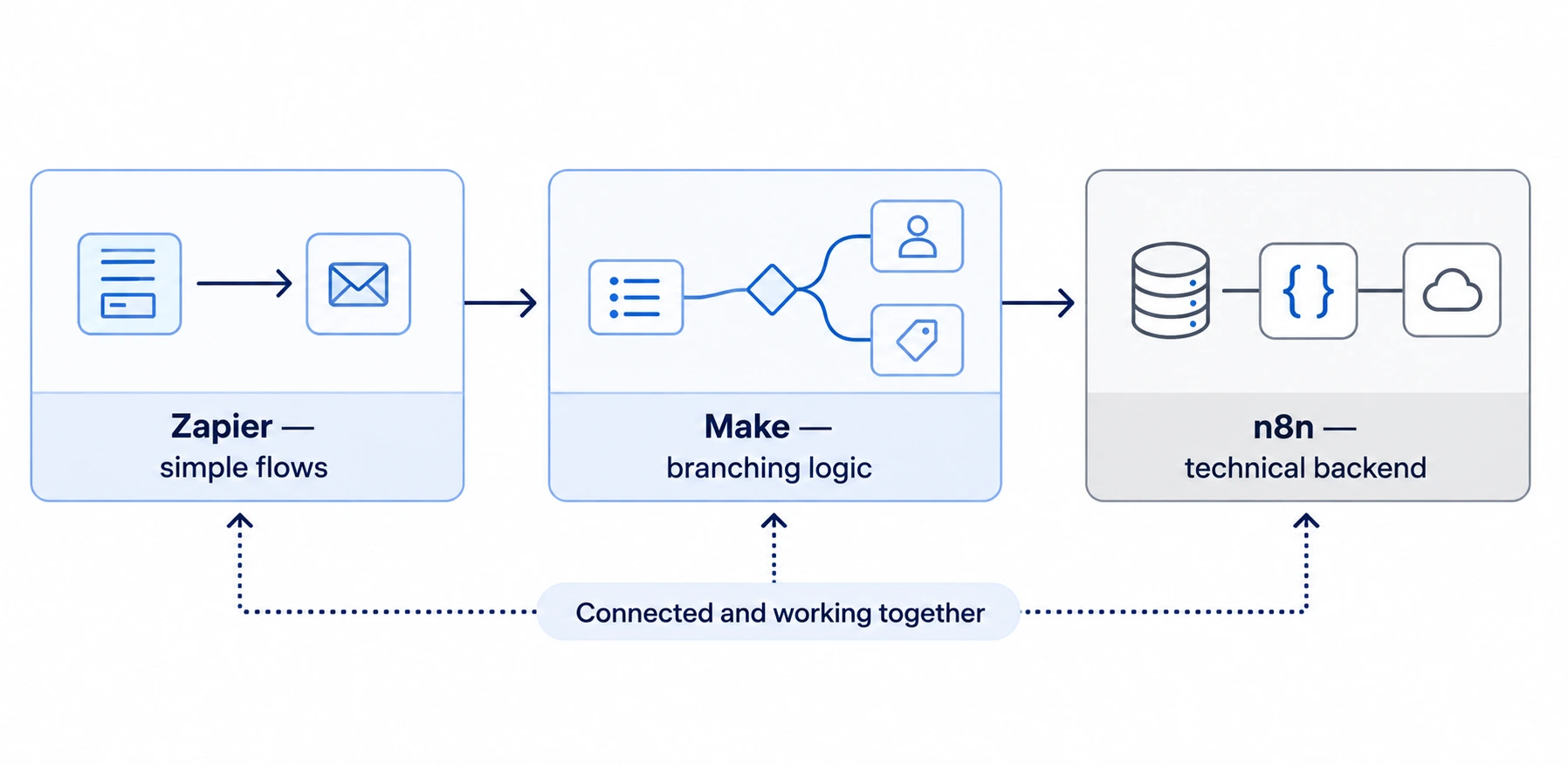
- Most small teams that survive past their first automation don’t pick one tool. The most repeated real-world pattern is a hybrid stack: Zapier for simple flows, Make for complex branching, n8n as the technical backend.
- The hidden cost of self-hosting n8n (maintenance time) is real, and independent cost estimates put a real production instance at $130–800+/month once infra and DevOps time are counted, not the “$6/month” figure most reviews repeat uncritically.
- Relay.app and Lindy are real alternatives that fit narrower cases where none of the big three is the best pick.
Zapier vs Make vs n8n: Pricing at a Glance
Each platform prices automation differently, so the same workflow can cost very different amounts depending on which tool runs it. The table below lines up starting prices, billing models, and monthly limits so you can compare them at a glance.
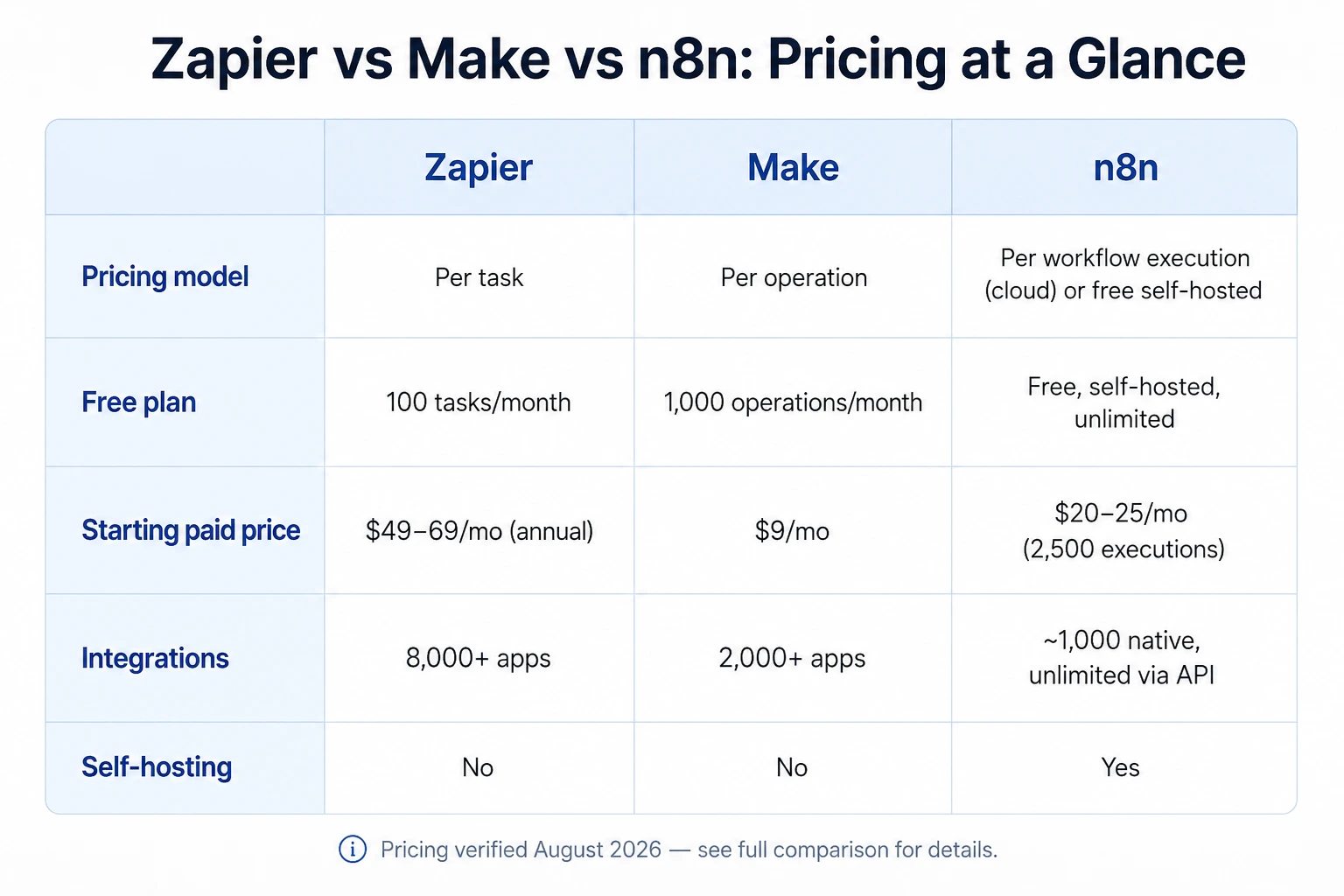
Zapier charges per task, Make charges per operation, and n8n charges per workflow execution or lets you self-host for free.
Each model rewards a different kind of workflow, so the cheapest option depends on how many steps your automations run and how often they run them. The table below breaks down starting prices, integrations, and self-hosting options side by side.
If you only have a minute, this table gives you the whole picture.
| Factor | Zapier | Make | n8n |
|---|---|---|---|
| Pricing model | Per task (action step) | Per operation | Per workflow execution (full run = 1 unit) |
| Free plan | 100 tasks/month, 3 active Zaps | 1,000 operations/month | Unlimited on self-hosted; community cloud available |
| Starting paid price | $29.99/month (750 tasks) | $9/month (Core, 10,000 ops) | Free self-hosted / €20/mo cloud (2,500 executions) |
| Integrations | 8,000+ app connectors | 2,000+ apps | 400+ native nodes + 600+ community, unlimited via API |
| Self-hosting | No | No | Yes |
| Best for | Non-technical teams, fastest setup | Visual mid-complexity flows, budget-conscious power users | Developers, technical teams, agencies, AI workflows |
Pricing verified August 2026. n8n’s cloud tiers are billed in euros — see the full pricing section below for exact figures.
What Zapier, Make, and n8n Actually Are
All three tools connect your apps and run tasks for you without manual work. The difference is who owns the engine, how much it can do, and how much it costs to run at scale.
Zapier
Zapier was founded in 2011 and created the modern category of no-code app automation.
The pitch has not changed. Connect two apps, set a trigger, set an action, done, with no code. With 8,000+ native connectors and thousands of pre-built templates, Zapier is still the fastest way for a non-technical person to get an automation running.
It is fully cloud-hosted and has added Zapier Agents, Zapier Copilot, and an MCP server connecting AI tools to its actions. It reportedly made around $310M in revenue in 2024.
Make
Make (formerly Integromat) sits between Zapier and n8n.
It gives you a visual, flowchart-style canvas that makes complex branching easier to see than Zapier’s linear model, while staying cheaper for mid-volume work. It bills per operation, not per task or execution, and has its own AI layer (Maia assistant, Make AI Agents in beta).
Make is cloud-only, there is no self-hosted option, which matters if data residency is a requirement.
n8n
n8n is a workflow automation platform launched in 2019 by Jan Oberhauser as an open-source alternative to proprietary tools. The idea is simple.
Developers and technical teams should own their automation, not rent it. n8n runs on any server you control, supports native JavaScript and Python inside workflows, and has shipped 70+ AI-specific nodes (per third-party count) covering LLMs, embeddings, vector stores, and multi-agent orchestration.
By late 2025, n8n had raised $253M across four rounds, reached a $2.5B unicorn valuation, and served over 230,000 active users and 3,000+ enterprise clients worldwide.
| Zapier | Make | n8n | |
|---|---|---|---|
| Founded | 2011 | Launched 2012 as Integromat, rebranded 2019 | 2019 |
| Model | Proprietary SaaS | Proprietary SaaS | Open-source, fair-code license |
| Hosting | Cloud only | Cloud only | Self-hosted or n8n Cloud |
| Ideal user | Non-technical user, marketer, ops team | Ops/marketing power user comfortable with a visual canvas | Developer, automation engineer, technical agency |
| Philosophy | Click-to-connect simplicity at any scale | Visual logic without code | You own your automation infrastructure |
Pricing: What You Really Pay, Not the Sticker Price
Billing is where these tools split the most, and where most reviews leave you guessing. The rule is short. Zapier charges per task. Make charges per operation. n8n charges per execution. That difference decides your bill at scale.
Zapier counts every single action step as one billable task.
A 5-step Zap running 1,000 times eats 5,000 tasks. Make counts each module run as one operation — broadly similar to Zapier’s model, but priced lower per unit. n8n counts the whole run as one execution, no matter how many nodes it holds. A 20-node workflow running 1,000 times uses just 1,000 executions.
At any real scale, that gap is enormous.
Zapier Pricing (August 2026)
Zapier’s plans scale with how many tasks you run each month, not with how many apps or workflows you build. The table below shows what each tier costs and where the jump in price happens.
| Plan | Price | Tasks/Month | Key Features |
|---|---|---|---|
| Free | $0 | 100 | 3 active Zaps, single-step Zaps only |
| Professional | Starts at $29.99/month (billed monthly), scales with volume — e.g. $73.50/mo at 2,000 tasks, $49/mo billed annually | 750 (entry) | Unlimited Zaps, multi-step, filters, paths |
| Team | Starts around $103.50/month at 2,000 tasks (monthly), $69/mo billed annually | 2,000 (entry) | Shared workspace, 25 seats included |
| Enterprise | Custom | Custom | SSO, advanced permissions, dedicated support |
Zapier’s task pricing is a slider tied to volume, not a flat number — any price you see quoted should specify the task volume it’s based on.
Make Pricing (August 2026)
Make’s plans are built around a shared operations pool, and the price jumps come from features like priority execution and team roles, not from more operations at the entry tiers. The table below lays out each plan’s cost and monthly allowance.
| Plan | Price | Operations/Month | Key Features |
|---|---|---|---|
| Free | $0 | 1,000 | Basic scenarios |
| Core | $9/month (annual discounted 15%+) | 10,000 | Base automation features |
| Pro | $16/month (annual discounted) | 10,000 | Priority execution, custom variables |
| Teams | $29/month (annual discounted) | 10,000 | Full-text log search, team roles |
| Enterprise | Custom | Custom | Dedicated support, SLAs |
Worth stating plainly since it’s easy to miss: Core, Pro, and Teams all share the same 10,000-operation base at their entry price — the tiers differentiate by features, not by volume, at that price point.
n8n Pricing (August 2026)
n8n’s pricing splits into two paths: self-host for free with unlimited executions, or pay for a managed cloud plan that scales with monthly execution volume. The table below shows what each tier includes.
| Plan | Price | Executions | Key Features |
|---|---|---|---|
| Community (Self-Hosted) | Free forever | Unlimited | Full feature set, pay server costs only (~$6–$15/month) |
| Starter (Cloud) | €20/month billed annually | 2,500/month | Managed cloud, basic logging |
| Pro (Cloud) | €50/month billed annually | 10,000/month | Advanced logging, debug mode, unlimited workflows |
| Business (Self-Hosted) | €667/month billed annually | 40,000/month | SSO, Git version control, queue-mode scaling |
| Enterprise | Custom | Custom | Dedicated support, SLA, advanced compliance |
n8n’s cloud pricing is billed in euros, not dollars — convert at the current rate if you’re budgeting in USD. Its billing unit is the “execution” (one whole workflow run, regardless of step count), which is genuinely different from Zapier and Make’s per-step models.
The cost at real volume
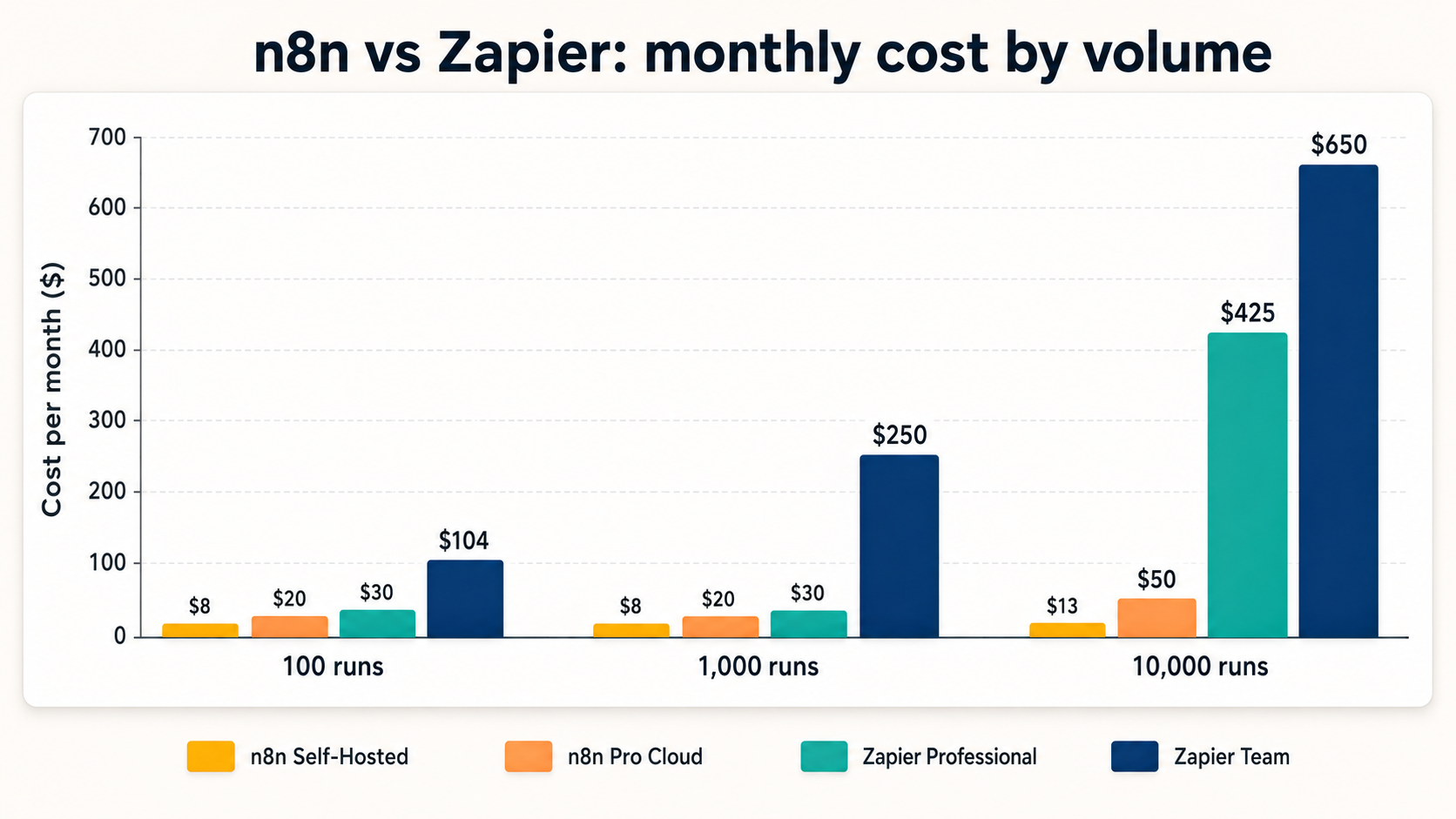
Here is what each tool costs across realistic usage, assuming an 8-step average workflow.
The pattern is clear. As runs go up, n8n stays cheap, Make climbs moderately, and Zapier climbs hardest.
| Monthly Workflow Runs | n8n Self-Hosted | n8n Pro Cloud | Make Core/Pro | Zapier Professional |
|---|---|---|---|---|
| 100 runs | ~$6–$10/mo (server) | ~€20/mo | $9–$16/mo | $29.99/mo |
| 1,000 runs | ~$6–$10/mo (server) | ~€20/mo | $16–$29/mo (extra ops likely needed) | ~$70–$100+/mo (add-ons required) |
| 10,000 runs | ~$10–$15/mo (server) | ~€50/mo | $29/mo+ (extra op packs) | ~$350–$500+/mo |
| 100,000 runs | ~$15–$30/mo (bigger VPS) | Enterprise pricing | Enterprise custom | Enterprise custom (likely $1,000+/mo) |
For any team running more than 1,000 complex executions per month, n8n self-hosted is dramatically cheaper than either Make or Zapier at the same volume, often 10 to 20 times cheaper than Zapier.
If you want a system built and maintained for you rather than piecing one together yourself, that’s the work we do every day as an n8n automation agency.
The 2025 “Success Tax”: n8n’s Execution-Pricing Change Explained
If you are weighing n8n, you need to know about one change from 2025.
It can raise your bill if your workflows run often. The fix is a simple design choice, and we will cover it.
On August 7, 2025, n8n changed how it bills higher-tier and enterprise plans. Before, limits were based on how many workflows you had active at once. Now, billing is based on the number of executions. One full end-to-end run equals one execution, no matter how many nodes, records, or API calls it processes inside.
Why does this matter? It changes the math for high-volume teams.
A team running 50 workflows that each fire 1,000 times per month now pays for 50,000 executions, not just for having 50 workflows switched on. For real-time CRM sync, continuous lead processing, or high-frequency pipelines, costs go up under the new model. Parts of the community call this a “success tax.”
As your automation runs more, you pay more. n8n’s view is that the model is fairer, since you pay for actual usage, not for idle workflows. The practical move for any n8n user is to audit high-frequency workflows and ask whether they should run as a scheduled batch instead of trigger-per-event.
That single change can cut executions by 80 to 90 percent with no loss of function.
Pro Tip: Before you scale, batch your high-frequency triggers. In our client builds, switching a per-event sync to a 15-minute batch run is the fastest way to keep execution costs flat as volume grows.
Ease of Use and Learning Curve
Zapier wins here, and it is not close.
A non-technical user can ship a working automation in 15 to 30 minutes. Make sits in the middle — its visual canvas is more approachable than n8n’s node graph, but branching logic still takes some learning. n8n asks the most of you up front but gives you the most control once you learn it.
Zapier’s guided interface, auto-field mapping, and thousands of templates mean you pick a trigger app, pick an action app, map the fields, and you’re done.
Make’s canvas shows every module and connection visually on a flowchart, which makes complex branches easier to understand at a glance than Zapier’s linear “Paths,” but building that logic from scratch takes longer than a Zap.
n8n feels more like engineering software. Its node canvas expects you to understand JSON data, node connections, and expression syntax. Plan a 2 to 4 week learning curve if you have no automation background.
For developers, n8n is actually more transparent, since you can inspect exactly what data passes between each node at every step.
| Zapier | Make | n8n | |
|---|---|---|---|
| Time to first working workflow | 10–15 minutes | 20–40 minutes | 30–90 minutes (self-hosted setup included) |
| Non-technical user accessibility | High, built for non-developers | Moderate-high, visual but has a curve on branching | Moderate, requires some technical comfort |
| Debugging capability | Basic, task history view | Good, visual execution history per module | Excellent, step-through execution, pinned test data |
| Template library | Thousands of Zap templates | Thousands of scenario templates | 500+ community templates |
| Learning resources | Extensive documentation + Zapier University | Docs + academy courses | Growing docs + active community forum |
Integrations and Ecosystem
Zapier’s app library is its strongest card.
Make covers the mainstream tools most small businesses need. n8n’s smaller native library is offset by one node that connects to almost anything.
As of August 2026, Zapier lists 8,000+ native connectors, including 450+ AI-focused integrations. Make covers 2,000+ apps, strong on marketing, CRM, and data tools, with a visual module system for mapping fields between them.
n8n’s native library is smaller, with 400+ official nodes plus around 600+ community nodes, for a practical total above 1,000. The equalizer is n8n’s HTTP Request node.
It connects to any service with a REST or GraphQL API, so the real integration universe is unlimited. The catch is that this takes more technical setup than clicking a native connector.
| Zapier | Make | n8n | |
|---|---|---|---|
| Native integrations (Aug 2026) | 8,000+ app connectors | 2,000+ apps | 400+ official nodes |
| Community/additional integrations | Partner ecosystem | Custom apps via API/webhook modules | 600+ community nodes |
| Custom API access | Webhook + limited HTTP support | HTTP module, more flexible than Zapier’s | HTTP Request node, any REST/GraphQL API |
| Building custom integrations | Closed, must apply to Zapier’s partner program | Closed, custom apps via Make’s own builder | Open-source, anyone can contribute nodes |
For mainstream tools like Slack, HubSpot, Salesforce, Gmail, Notion, Airtable, and Shopify, all three platforms have solid native support.
For very niche or legacy tools with weak API docs, Zapier’s ready-made connectors have a real edge. For internal APIs or custom infrastructure, n8n’s HTTP node and open-source design win clearly.
Workflow Logic, Branching, and AI Orchestration in 2026
This is where the three tools separate the most. Zapier handles simple, mostly linear flows. Make handles visual branching well. n8n handles the messy, code-level logic and AI orchestration that technical teams need.
Zapier offers a basic “Paths” feature for branching, but it is limited to a few branches and cannot do loops, nested conditions, or dynamic branching based on live data. Its model is linear at heart.
Make’s canvas is built around branching from the start — routers split a flow into multiple paths visually, which is easier to read than Zapier’s Paths for anything beyond 2-3 branches, though it still can’t match n8n’s code-level control.
n8n supports the full range developers expect: IF/ELSE conditions with unlimited branches, Switch nodes for multi-path routing, loop nodes (SplitInBatches) for arrays, error-handling sub-workflows, and parallel paths that merge later, plus native JavaScript and Python code nodes for logic that no UI can anticipate.
For AI work in 2026, all three have added capabilities, but they are not equally documented or equally capable:
- n8n — the most technically documented of the three. Ships a native AI Agent node with typed sub-node connections for AI Language Model, AI Memory, AI Tool, AI Retriever, AI Text Splitter, AI Embedding, and AI Document. Supports tool use, multi-turn memory, and can call other workflows as tools. Third-party counts put this at 70+ dedicated AI nodes.
- Make — has Maia, an AI assistant built into the platform, and Make AI Agents in beta. Exact feature specifics weren’t independently verifiable at publish time, so treat these as directionally real but still maturing.
- Zapier — offers Zapier Agents and AI Copilot, plus an MCP server connecting AI tools to its actions. As with Make, exact feature depth wasn’t independently verifiable at publish time.
The question that matters more than feature lists is which pricing model survives an AI agent actually running at volume — an agent can trigger far more calls than a simple linear Zap.
Per-task and per-operation billing (Zapier, Make) scales cost directly with agent activity. n8n’s per-execution billing is more forgiving here, since one agent run with many internal steps is still one execution.
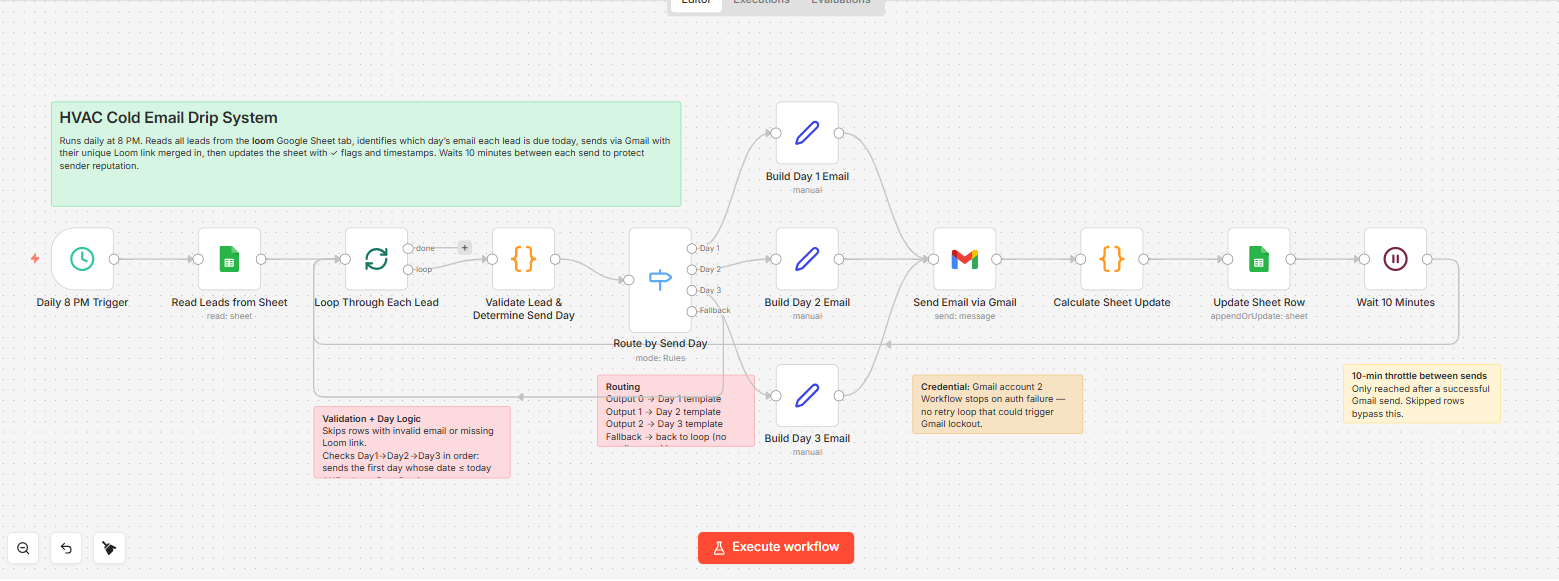
Here is a real AI workflow shape in n8n:
Webhook trigger → Extract email text → OpenAI node (classify intent)
→ Switch node (route by intent)
   → Branch A: Query internal PostgreSQL knowledge base → Generate response → Send reply
   → Branch B: Escalate to Slack → Notify human agent
→ Log all executions to Airtable
Zapier can approximate the first few steps with its AI actions and ChatGPT connector. Make can route this visually with routers and its AI modules.
The branching depth, database query, and execution logging are where n8n’s code-level control still pulls ahead.
Self-Hosting, Security, and Compliance
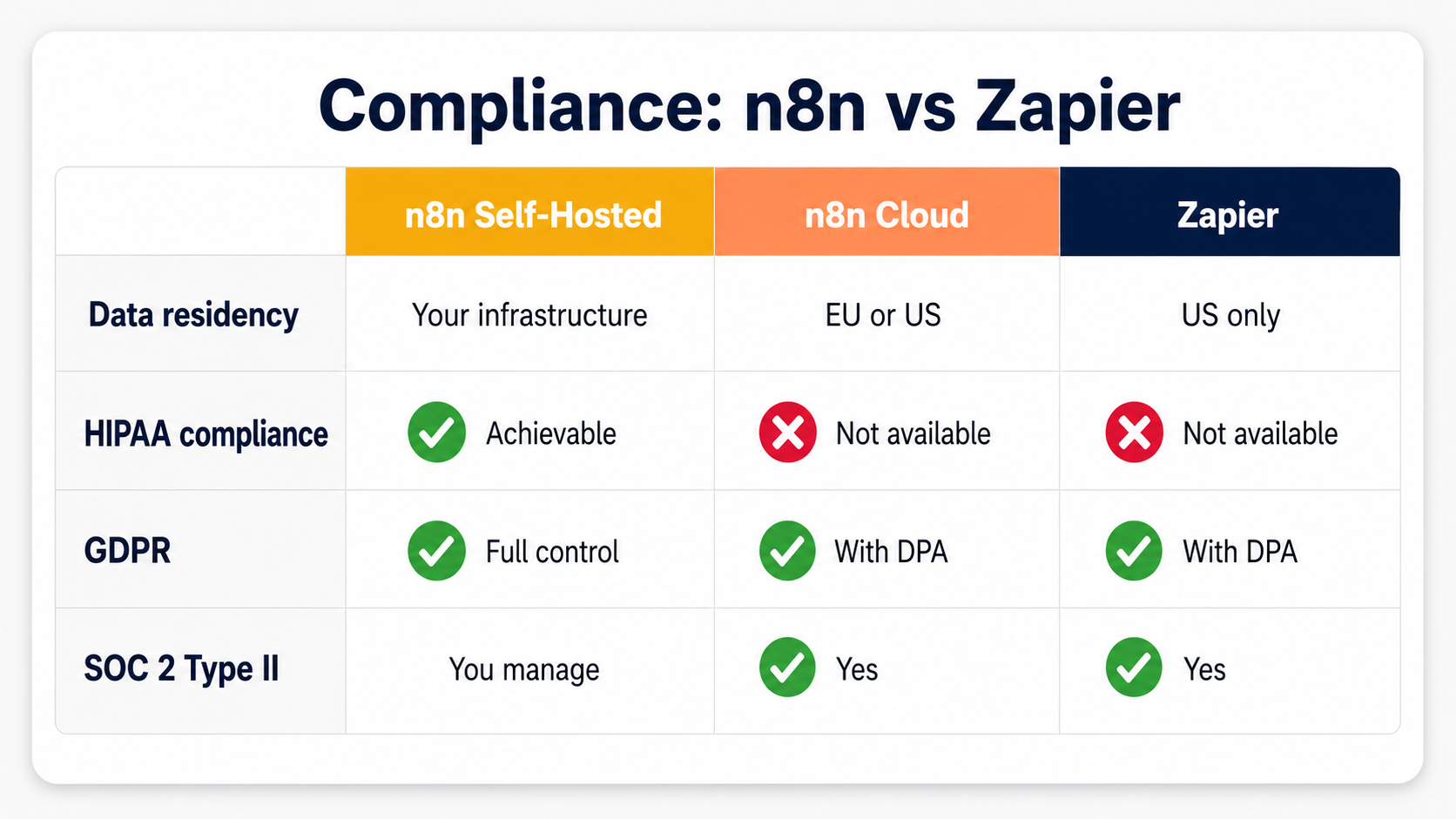
If your data cannot leave your own servers, this section decides everything. Neither Zapier nor Make can be self-hosted. n8n can. For regulated work, that is the whole ballgame.
All Zapier and Make data, execution history, credentials, and logic flow through their own cloud servers.
For healthcare, finance, legal, and government teams, or anyone under GDPR data residency rules, this is often a hard blocker for both. n8n can run on any infrastructure you control — a $6/month VPS, a private AWS VPC, an on-premises server, or a Kubernetes cluster with a Helm chart.
When self-hosted, your data never touches n8n’s servers.
| Feature | n8n (Self-Hosted) | n8n Cloud | Zapier | Make |
|---|---|---|---|---|
| Data residency | Fully in your own infrastructure | EU or US data centres | US-hosted only | EU/US-hosted only |
| SOC 2 Type II | You manage | Yes | Yes | Yes |
| HIPAA compliance | Achievable, your infrastructure | Not available | Not available | Not available |
| GDPR | Full control | With DPA | With DPA | With DPA |
| SSO / SAML / LDAP | Business+ plans | Business+ plans | Enterprise plan | Enterprise plan |
| Self-hosting | Yes | N/A | No | No |
For any team in a regulated industry or with strict data sovereignty needs, n8n self-hosted is the only viable choice of the three.
The Real Total Cost of Ownership: What Nobody Tells You About Maintenance
“n8n self-hosted is free” is technically true and practically incomplete. When you self-host, you own the server and everything that breaks on it.
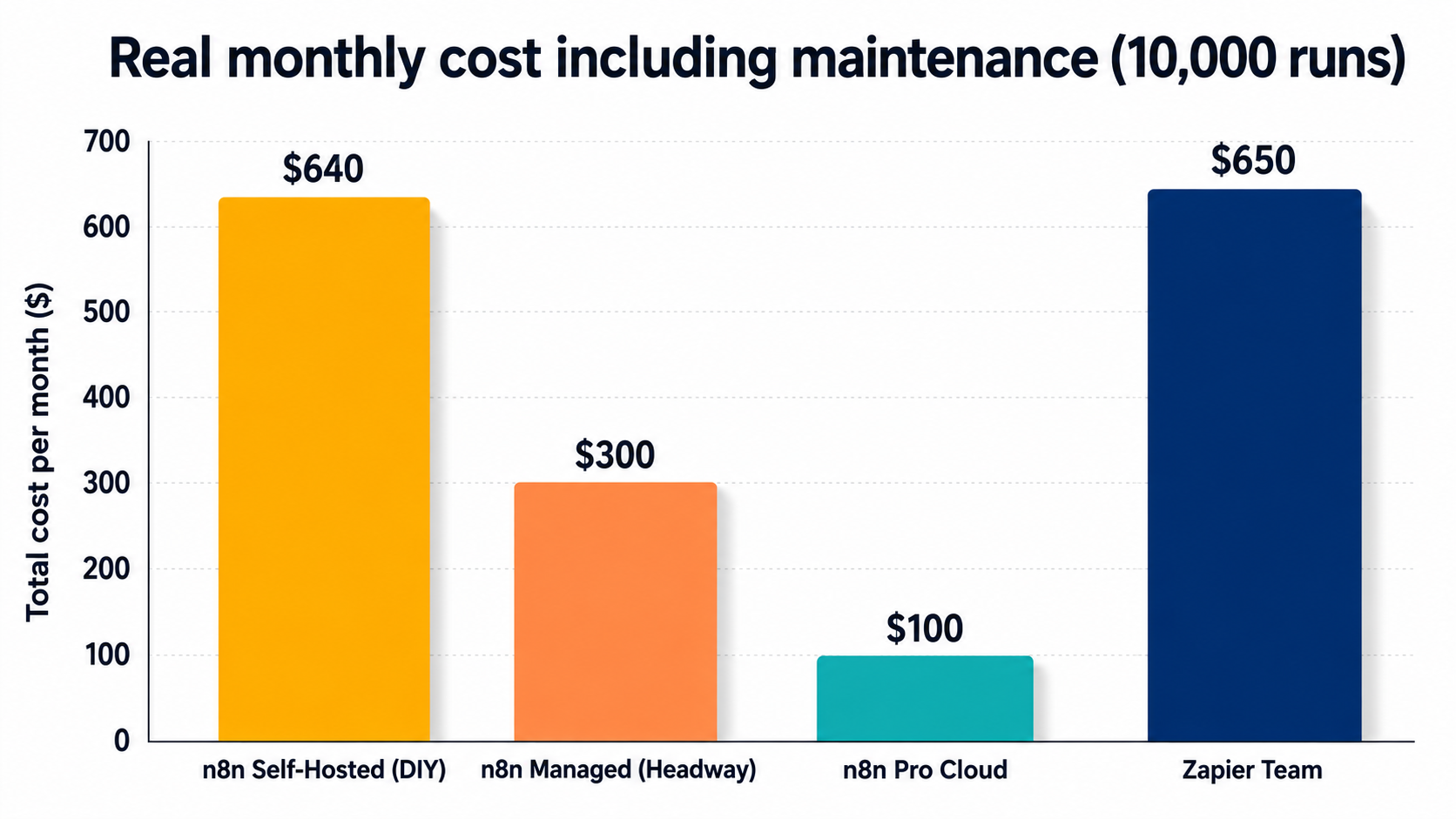
Independent cost breakdowns (not one audited source, but several blog-level estimates that converge on a similar range) put a real production self-hosted n8n instance at roughly $130–800+/month once infra, backups, and DevOps time are counted — and enterprise-tier features like SSO can add $10,000–25,000+/year in licensing on top of that.
Zapier and Make don’t carry this maintenance burden since they’re fully managed, but you pay for that in the subscription itself.
Hidden maintenance costs of self-hosting n8n
Self-hosting n8n is free in dollars, but it isn’t free in time. Someone has to patch the server, upgrade versions, and fix nodes when an API changes on the other end. The table below shows how much time that upkeep actually takes each month.
| Maintenance Task | Frequency | Hours/Month (Est.) | Cost at $75/hr Dev Rate |
|---|---|---|---|
| Server patching and OS updates | Monthly | 1–2 hrs | $75–$150 |
| n8n version upgrades (with testing) | Monthly–Quarterly | 1–3 hrs | $75–$225 |
| Node breakage after API changes | Occasional (avg. 1–2 per month) | 1–4 hrs | $75–$300 |
| Uptime monitoring and incident response | Ongoing | 0.5–2 hrs | $37–$150 |
| Backup verification and restore testing | Monthly | 0.5–1 hr | $37–$75 |
| Security review and credential rotation | Quarterly | 1–2 hrs amortised | $25–$50/month |
| Total estimated monthly overhead | 4–14 hours | $300–$950/month |
Net TCO comparison (after maintenance)
The sticker price on n8n’s free tier hides the real cost until you add maintenance time back in. The table below compares total monthly cost across scenarios once server upkeep and troubleshooting hours are factored in.
| Scenario | Software Cost/Mo | Maintenance Cost/Mo | Total TCO/Mo |
|---|---|---|---|
| n8n self-hosted (DIY, 10K runs/mo) | $10–$15 (server) | $300–$950 (dev time) | $310–$965/mo |
| n8n self-hosted (with Headway Automation managed support) | $10–$15 (server) | Fixed retainer (lower than DIY) | Significantly lower effective cost |
| n8n Pro Cloud (10K runs/mo) | ~€50 | $0–$100 (monitoring only) | Roughly $55–$155/mo |
| Make Pro/Teams (10K ops/mo) | $16–$29 | $0 (managed) | $16–$29/mo |
| Zapier Team (10K runs/mo, 8-step avg) | $500–$800 | $0 (managed) | $500–$800/mo |
The honest conclusion is this. n8n self-hosted is cheapest when you have an in-house automation owner or a managed support partner. Without that, the hidden maintenance burden can quietly pass Make’s or even Zapier’s subscription at low-to-mid volume.
That is the exact gap we built our managed n8n service to fill, so you get n8n’s low software cost without the 2am incident calls.
Why Most Small Teams Don’t Pick Just One
Every comparison article treats this as a one-tool decision. It usually isn’t.
The most repeated pattern among small teams who’ve actually run these tools for a while isn’t “we picked Zapier” or “we picked n8n” — it’s a hybrid stack: Zapier for simple linear flows, Make for anything with real branching, and n8n as the technical backend for the workflows that need to scale cheaply or touch sensitive data.
The reason isn’t indecision.
It’s that the real cost of an automation tool isn’t building the first workflow — it’s owning it after it breaks. A tool that silently fails without a clear error is a different kind of risk than one that hands you a failure node to debug.
Before you lock in one tool for everything, run through a short failure-cost checklist:
- Does a silent failure in this workflow get logged anywhere a human will actually see it?
- Do writes to your CRM need a review or rollback step before they’re final?
- Do outbound triggers (emails, texts, calls) need a suppression rule so a bug can’t spam a customer?
- Is there a named human owner for this workflow, not just “whoever built it”?
- Does anything touching revenue data leave an audit trail?
If the answer to most of these is no, the tool matters less than the ownership plan around it. That’s true whether you’re running one platform or three.
Real-World Case Studies
Automation only matters if it produces results. These verified case studies show the kind of return teams get from each ecosystem.
- Vodafone (n8n): Overhauled its threat-intelligence pipeline with n8n, reportedly saving £2.2 million by automating data enrichment, alert routing, and security workflows that used to need heavy manual analyst time.
- Stepstone (n8n): The European job platform integrated more than 200 critical data workflows through n8n, reaching data integration speeds up to 25 times faster than its previous processes.
- Musixmatch (n8n): The music data platform reported saving 47 engineering-days of work in just 4 months by replacing custom-coded pipelines with n8n workflows.
- Delivery Hero (n8n): The global food delivery company used n8n to orchestrate complex operational workflows across many systems, letting its engineers move faster without custom integration code.
- Vendasta (Zapier ecosystem, via HatchWorks): A digital marketing platform reclaimed about $1 million in operational efficiency by automating client onboarding, reporting, and CRM workflows.
- SisterLove (Zapier ecosystem): A healthcare nonprofit automated donor engagement and program tracking, saving the equivalent of 282 workdays per year.
The pattern is consistent. The return from automation, on any of these platforms, tends to be measured in hundreds of engineering hours or millions of dollars at scale. The platform you pick mainly affects how fast you get there and how much control you keep.
Agency Use vs In-House Use: Different Tools Win
The right tool changes based on who you build for. Building for your own internal team is a different problem than building for clients. Almost no comparison article makes this distinction, but it is one of the most practical questions buyers ask.
If you are an agency or automation freelancer building for many clients, n8n’s advantages are structural. You can deploy a separate n8n instance for each client on their own infrastructure, so their data never mixes, their credentials stay in their own environment, and you hand off a system they own outright. When a workflow breaks at 2am after an API change, n8n’s step-through execution, pinned test data, and detailed error logs make the fix tractable.
If you are an in-house team with no dedicated automation engineer, Zapier’s managed infrastructure and simpler interface often make more sense for the simple stuff, and Make is a strong middle ground when you need visual branching but not full code control. When the person who built the automations changes roles, a Zapier or Make account is easier for a non-technical successor to understand and maintain than a self-hosted n8n instance.
The honest framing is short. n8n rewards technical ownership. Zapier and Make reward simplicity and support, with Make giving you more logic before you hit its ceiling. Agencies who build and manage systems for clients, like us, almost always choose n8n for its flexibility, exportability, and zero vendor lock-in, so clients own the system, not the platform.
How to Migrate to n8n From Zapier or Make
Every comparison article shows you how to build the same workflow in both tools. Almost none show you how to move an existing account over. If you have outgrown Zapier’s or Make’s pricing, this is the part you need.
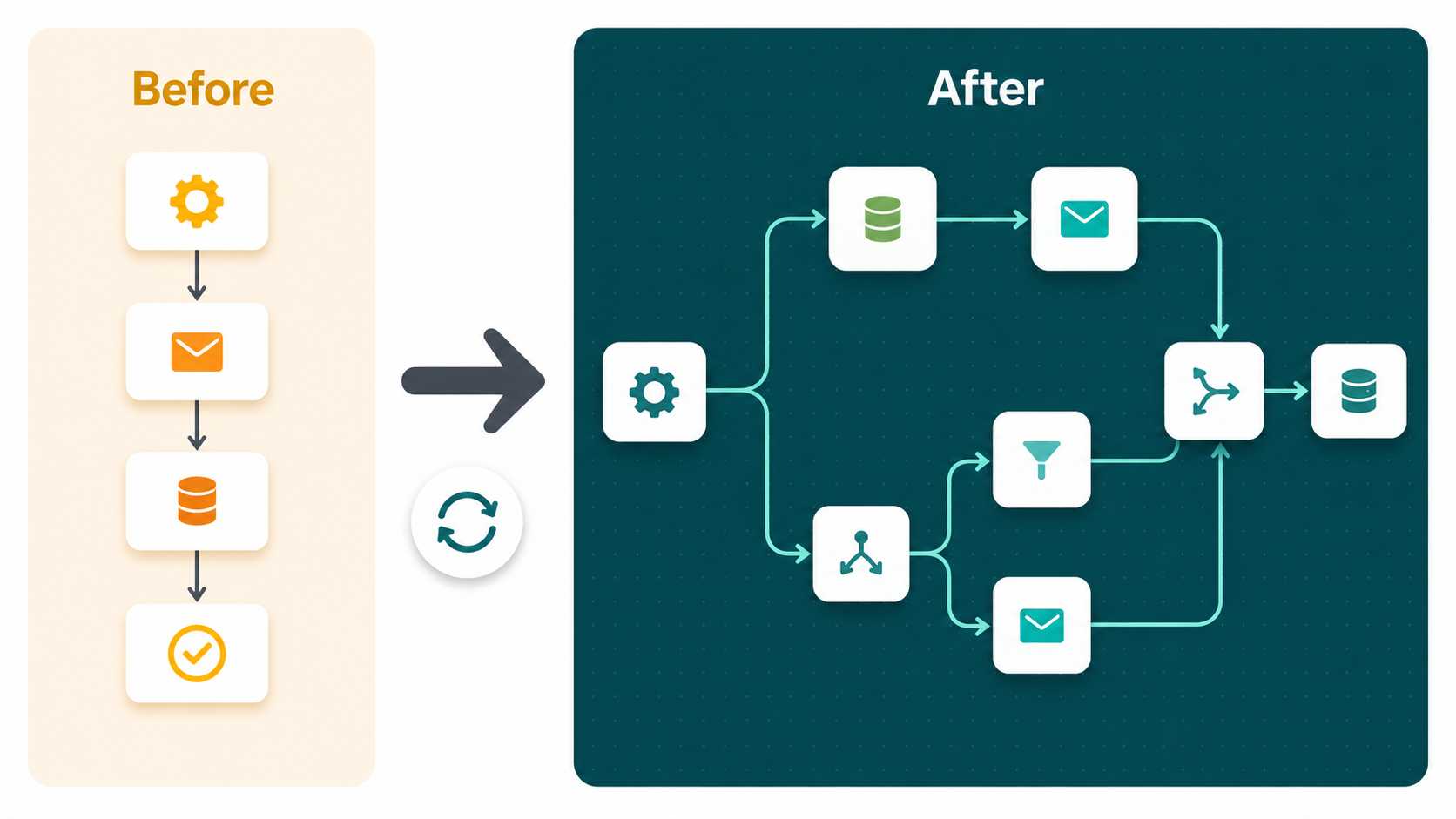
First, learn the language. Most Zapier and Make concepts map cleanly to n8n.
| Zapier / Make Concept | n8n Equivalent |
|---|---|
| Zap / Scenario | Workflow |
| Trigger | Trigger node (Webhook, Schedule, App trigger) |
| Action step / Module | Node |
| Task / Operation (billing unit) | Execution (entire workflow = 1 unit) |
| Filter | IF node condition |
| Paths / Router (branching) | Switch node |
| Formatter | Set node / Code node / built-in expressions |
| Delay / Sleep module | Wait node |
| Webhook trigger | Webhook node |
| Schedule trigger | Schedule trigger (cron) |
| Code step (JS) | Code node (JavaScript or Python) |
Then follow these steps.
- Audit your existing automations. Export a list of all active Zaps or Scenarios. Note the trigger app, each action, filters, and paths. Find the highest-volume ones. Those are your highest-value migrations.
- Set up n8n. Deploy self-hosted via Docker on a $10/month VPS in under 30 minutes, or sign up for n8n Cloud for a managed environment.
- Rebuild credential connections. Every integration in n8n needs its own API keys or OAuth setup. Plan 15 to 30 minutes per unique service.
- Rebuild high-priority workflows first. Map triggers to n8n trigger nodes, then rebuild each action as a node. For any app without a native node, use the HTTP Request node with the app’s API docs.
- Run parallel validation. Keep the old tool active for 1 to 2 weeks while you test the n8n versions on real data. Compare outputs before you switch anything off.
- Cancel the old subscription. Once every workflow is stable in n8n, cancel. Export any documentation to your own records first.
A simple 3-step automation takes 30 to 60 minutes to rebuild. A complex multi-path workflow with custom formatting takes 2 to 4 hours. Most teams finish a full migration in 2 to 4 weeks.
Best Practice: Migrating back from n8n follows the same map in reverse, but with one big catch. n8n is open-source and exports as JSON, so you can take your entire workflow library out at any time. Neither Zapier nor Make offers that kind of export. Cancel either one and you lose your configurations. That portability gap is one of the strongest practical arguments for n8n.
Zapier vs Make vs n8n: Which One Fits Your Business
Google’s own AI Overview for this exact question boils it down to three things worth asking yourself: What apps do you need to connect? How many tasks or runs do you expect per month? Do you or your team have any coding or server-hosting skill? Answer those three and the decision gets much simpler.
Choose Zapier if:
You need a working automation today, your team is non-technical, and you’re connecting mainstream or niche SaaS apps that already have a native Zapier connector.
Choose Make if:
You need visual branching logic that Zapier’s Paths can’t handle, you want to see the whole flow on a canvas, and your budget is tighter than Zapier’s but you still don’t want to touch code or a server.
Choose n8n if:
You run more than 1,000 complex workflows a month, you need custom code or AI agent logic, your data can’t leave your own infrastructure, or you’re an agency building systems clients will own.
Decision Matrix: Which Tool Wins in Which Scenario
You do not need to weigh every feature. Find your situation in this table and you have your answer.
| Scenario | Best Choice | Why |
|---|---|---|
| Non-technical team needing automation today | Zapier | Fastest setup, guided interface, no infrastructure |
| Connecting two niche SaaS apps with no API docs | Zapier | 8,000+ native connectors, likely already supported |
| Complex branching logic, no code allowed | Make | Visual router/canvas built for multi-path flows |
| High-volume automations (>5,000 runs/month) | n8n | Execution pricing is 5–20x cheaper than per-task or per-operation billing |
| Data must stay inside your own infrastructure | n8n Self-Hosted | Zapier and Make’s cloud-only model is a hard blocker |
| Building AI agent workflows (LangChain, RAG, memory) | n8n | Native 70+ AI nodes, LangChain integration, tool-use routing |
| Regulated industry (healthcare, finance, government) | n8n Self-Hosted | HIPAA, data residency, and compliance only achievable self-hosted |
| Agency building automation for clients | n8n | Client-owned infrastructure, zero vendor lock-in, debuggable |
| Solo founder or non-technical business owner | Zapier or Make | n8n’s learning curve isn’t worth it without technical support |
| Budget is zero or near-zero | n8n Self-Hosted | ~$6–$10/month server cost vs Zapier’s $29.99 or Make’s $9 minimum |
| In-house team with no dedicated automation owner | Zapier or Make | Managed uptime, easier handoff, no maintenance burden |
| Developer needing custom code in workflows | n8n | Native JS + Python nodes; neither Zapier nor Make offers this level of code access |
| Avoiding vendor lock-in | n8n | Open-source, exportable as JSON, no proprietary format |
| You don’t want to commit to just one tool yet | Hybrid stack | Zapier for simple flows, Make for branching, n8n for the technical backend |
Who Should Not Use Each Tool
Most articles only tell you who each tool is good for. The more useful and honest test is the opposite. Where will each one let you down?
Do not use n8n if:
- You have no technical capability in-house and no plan to hire or partner with a specialist.
- You need a working automation in the next 2 hours and have never used the platform.
- Your team changes often and non-technical successors must manage workflows without training.
- You need to connect several niche SaaS tools that have no public REST API and no native n8n or community node.
Do not use Zapier if:
- Your workflows process sensitive data under HIPAA, strict GDPR residency, or any rule that bars data from leaving your infrastructure.
- Your automations run at scale, more than 5,000 complex runs per month — per-task billing gets exponentially expensive.
- You need custom code, loops, complex branching, or integration with non-standard internal systems.
- You are an agency building systems clients need to own outright.
Do not use Make if:
- You need self-hosting or strict data residency — Make is cloud-only, same blocker as Zapier for regulated data.
- You need true code-level logic or AI agent orchestration beyond what its visual modules and beta AI Agents currently support.
- You’re an agency that needs to hand clients a system they fully own with no ongoing platform dependency.
Frequently Asked Questions
Is Make better than Zapier?
For visual branching logic on a budget, Make is generally the better pick — its canvas handles multi-path flows more clearly than Zapier’s linear Paths, and it’s cheaper per operation at most volumes. Zapier still wins on raw integration count and setup speed for simple, linear automations.
Can Make replace n8n?
Not for technical or high-volume use cases. Make can’t be self-hosted, can’t run custom code the way n8n’s Code node does, and its per-operation billing gets expensive at the volume where n8n’s per-execution model stays cheap. For visual, mid-complexity, cloud-only automation, Make is a real n8n alternative.
Which is cheapest at scale?
n8n, by a wide margin, once you’re past roughly 1,000 complex runs a month — whether self-hosted or on n8n Cloud. Make sits below Zapier but above n8n at most volumes.
Do I need to know how to code for any of these?
No, for Zapier or Make. Both are built for no-code use, though Make’s branching logic takes more learning than Zapier’s linear flows. n8n doesn’t require code either, but its node canvas and JSON handling assume more technical comfort, and code becomes an option (not a requirement) when you need it.
Can I switch between them later?
Yes, though it takes rebuilding. n8n exports workflows as JSON, so migrating away from n8n is straightforward. Neither Zapier nor Make offers a real export, so migrating away from either means rebuilding from scratch, same as migrating into n8n from them.
Can I use more than one of these at the same time?
Yes, and many small teams do. The most common real-world pattern is a hybrid stack: Zapier for simple flows, Make for anything with real branching, and n8n as the technical backend for high-volume or sensitive-data workflows.
Is n8n really free?
n8n’s Community Edition (self-hosted) is free forever. You pay only server costs, typically $6 to $15/month on a basic VPS for most small-to-medium workloads. n8n Cloud starts around €20/month for 2,500 executions. Independent estimates put a real production self-hosted instance at $130–800+/month once infra and DevOps time are counted, so “free” only holds at hobby scale.
What automation tool is best for agencies?
Agencies building automation for clients are best served by n8n. Its open-source, self-hosted design lets you deploy on the client’s own infrastructure, hand off systems the client owns outright, and keep full transparency over what the system does.
The Bottom Line
n8n wins on cost, control, and AI capability. Above roughly 1,000 complex runs per month, it is dramatically cheaper than either Zapier or Make, and its native LangChain integration, AI Agent node, and self-hosting make it the clear pick for technical teams and AI-first workflows.
Zapier wins on speed and accessibility, with 8,000+ connectors and a guided interface that non-technical teams genuinely love. Make wins the middle ground — more visual logic than Zapier, less commitment than n8n, at a lower price than either.
The 2025 execution-pricing change means high-frequency n8n teams should audit their workflows, and self-hosting is only truly cheap once you account for maintenance or hand it to a managed partner. And increasingly, the honest answer isn’t picking one — it’s running the right one of the three for each job.
Pick Zapier to start fast. Pick Make when you outgrow linear flows but don’t want a server. Pick n8n to own what you build and stop paying more every time your business grows.
Published by Headway Automation, specialists in custom n8n workflows for small and mid-sized businesses. We build lead capture, CRM automation, AI voice agent, and reporting systems that save teams 10+ hours every week without expensive monthly software fees.
Asim Arman is a CXL-certified conversion optimizer and n8n automation builder at Headway Automation. He writes SEO content professionally at VISER X and builds every system he writes about. More about Asim · LinkedIn
Pingback: How to Automate Repetitive Tasks: The Complete 7-Step Guide
Pingback: Workflow Automation for Small Business: What to Automate
Pingback: How to Automate Appointment Booking (Without It Quietly Failing)
Pingback: 6 Proven Workflow Automation Benefits for Small Business (Most Owners Only Know Half)