

Enter your missed calls per week, your average job value, your close rate, and how many of those callers you think would reply to a text. It runs entirely in your browser and sends nothing anywhere.
Now, a word about the numbers you will see quoted elsewhere.
You will read that missed calls cost the average small business around $126,000 a year, and that every individual missed call is worth roughly $1,000. Those figures appear across dozens of vendor sites in this category. We went looking for the study behind them and could not find one.
They appear to circulate from vendor to vendor, each citing the last, with no original research anywhere at the bottom of the chain.
Which is rather the point of the calculator above. Your own call log from last week beats a number that everyone repeats and nobody has checked. Most trades owners who run their real figures find the monthly total is larger than the cost of any tool they were hesitating over, often by a wide margin.
That is a more persuasive number precisely because you produced it yourself.
How to set up missed call text back, step by step
The native toggle takes under five minutes. The workflow approach takes twenty to thirty and gives you branching, CRM handoff and logging in return.
- Choose your approach. The built-in toggle inside your platform’s phone settings is the quick start. A workflow builder, using a call-status trigger, gives you full control.
- Get a local number. Use one with an area code matching your business location. Callers are noticeably less likely to reply to a text from an out-of-area or toll-free number, because it reads as spam before they have even opened it.
- Set your ring timeout. Decide how long the phone rings before the trigger fires, and match your platform’s timeout to your carrier’s forwarding setting. If the two race each other you get false triggers, which means texting people you actually spoke to.
- Write your message. Under 160 characters so it sends as a single SMS. Business name, acknowledge the call, one clear next step. Templates are below.
- Record a voicemail greeting that pre-announces the text. Something like: you have reached us, we are with a customer, look out for a text from us in a moment. This one step stops the automated message landing cold, and it costs you nothing. No competing guide mentions it.
- Register for 10DLC before you go live, not after. Skipping this is the most common reason a workflow appears to fire perfectly while the message never reaches anyone.
- Test it properly. Call your own number from a different phone and let it ring out. Confirm the text arrives and time it. Then call again and hang up after one ring, and check whether anything fired at all.
What to say in a missed call text
The message has one job: keep the caller engaged long enough for you to respond properly. It is not a sales pitch. It is a handshake through glass.
The wording matters more than most people assume. TextUs’s 2026 benchmark report, based on a survey of 763 revenue professionals, put average one-to-one business SMS response rates at 34.7%, roughly four times what typical cold email achieves, with the best-performing messages exceeding 56%.
The gap between an average text-back message and a well-built one is the difference between recovering a handful of missed calls and recovering most of them.
The four-part structure
- Identify the business. The caller may not have saved your number, and an unsigned text from an unknown number reads as spam.
- Acknowledge the call. Say you saw it. This is what makes it feel human rather than automated.
- Offer help. State what you do, or what they probably need.
- Invite a reply. One clear, frictionless next step. Not two.
Templates you can copy
Each of these fits in a single SMS segment. That matters more than it sounds: a message that spills into a second segment can be split, reordered or delayed by some carriers, and a split message reads as broken.
| Use case | Message |
|---|---|
| General | Hi, this is [Business]. I just missed your call, I’m with a customer right now. Reply here and I’ll get back to you within the hour. |
| On a job | [Business] here. Sorry, I’m on a job and can’t pick up. Reply with what you need and I’ll call you back as soon as I’m free. |
| Booking | Hey, [Business] here. Missed your call! If you’re looking to book, reply with a day that suits and I’ll confirm a time. |
| After hours | Hi from [Business]. We’re closed now but saw your call. Reply with your issue and we’ll get back to you first thing tomorrow. |
| Emergency | [Business] here, missed your call. If this is urgent (leak, no heat, no power), reply URGENT and I’ll ring you straight back. |
A few rules worth treating as absolute. Business name in every message. Under 160 characters. One clear next step. A rough timeline, because “shortly” tells the caller nothing about whether to wait or keep dialling. And no links in the first message, because carriers filter first-contact texts containing URLs far more aggressively. Send the booking link in your second message, after they have replied.
Staying compliant: TCPA and 10DLC
Compliance is not a footnote here. It is the difference between a system that runs and one that gets you a letter. What follows is a summary for business owners, not legal advice, and you should have a TCPA-qualified attorney review your own setup.
Start with the most important thing: this area of law is actively moving.
Two appellate decisions in the past eighteen months have narrowed the FCC’s authority to interpret the TCPA, both following the Supreme Court’s Loper Bright ruling.
Any guide that presents TCPA rules as settled and permanent is already out of date, including this one eventually. Check the dates on anything you read, including this.
What is well established
- The Telephone Consumer Protection Act covers automated text messages, not just voice calls. Satterfield v. Simon & Schuster established that it reaches unsolicited commercial SMS. Damages run up to $500 per violation, and up to $1,500 per violation where the breach was willful.
- In Facebook v. Duguid (2021) the Supreme Court narrowed the definition of an Automatic Telephone Dialing System to equipment using a random or sequential number generator. That narrowed exposure considerably, but did not eliminate it for platforms sending automated texts by other means.
- Consent can be revoked at any time, by any reasonable method. Include “Reply STOP to opt out” and make sure your platform processes opt-outs automatically rather than leaving it to someone to notice.
- Keep internal do-not-call records and honour requests for at least five years.
Two things you may have read that need correcting
You may have seen it written that an FCC one-to-one consent rule took effect on 27 January 2025. It did not. On 24 January 2025, three days before it was due to come into force, the Eleventh Circuit vacated it in Insurance Marketing Coalition v. FCC, holding that the Commission had exceeded its authority.
The court’s reasoning was that the statute requires prior express consent, not prior express consent plus additional conditions the FCC had added. The FCC has since deleted the vacated language.
There is no one-to-one consent requirement, and you should not restructure your consent capture around a rule that was struck down.
Separately, in Bradford v. Sovereign Pest Control of Texas, decided 25 February 2026, the Fifth Circuit held that the TCPA requires only prior express consent for automated telemarketing calls to wireless numbers, and that oral consent is sufficient. This expressly rejects the FCC’s 2012 written-consent interpretation.
One critical qualifier: the Fifth Circuit covers Texas, Louisiana and Mississippi only. It is not national law, and a business in Ohio cannot rely on it.
One thing this guide will not tell you: that an established business relationship, or the fact that a message is transactional or responsive rather than promotional, creates an automatic exemption for automated texts. You will see that argued elsewhere.
It may well turn out to be right. But it lacks clear current support for automated SMS specifically, and a confident answer here would be less useful to you than an honest one.
10DLC registration
US carriers require business SMS sent over long-code numbers to be registered through The Campaign Registry. Unregistered traffic gets filtered or blocked outright, and this is the trap: your workflow fires, reports success, and the message never arrives. Nothing in your dashboard tells you.
Budget one to four weeks end to end and treat anything faster as a bonus. Brand registration typically runs one to seven business days, campaign registration three to fourteen, and the biggest cause of delay is rejection, because every rejection restarts the clock. Get the submission right first time. Register first, test second, in that order.
Build it or buy it?
| Factor | Native toggle | Workflow builder |
|---|---|---|
| Setup time | Under 5 minutes | 20 to 60 minutes |
| Message options | One static message | Branching by time, day, call type |
| CRM handoff | No | Yes: pipeline stage, tags, owner assignment |
| Logging | Platform analytics only | Google Sheets, Airtable, anything you want |
| Business hours awareness | No | Yes |
| Reversibility | One toggle, instant | Publish or draft toggle |
On cost, GoHighLevel runs $97 a month for Starter, $297 for Unlimited and $497 for Agency Pro, with annual billing bringing those down to roughly $80, $247 and $414.
One thing worth knowing that rarely appears in comparisons: SMS, call, email and AI usage are billed separately on top, typically adding $20 to $150 a month depending on volume. Factor that in before comparing against anything else. Lightweight standalone tools sit well below the full CRM platforms, and self-hosted n8n costs nothing beyond the server it runs on.
The built-in toggle is genuinely good for a simple, single-location trades business that wants something working today rather than next week. Enable it, write one message, done. If that is you, use it and stop reading this section.
Where it falls short is that one message fits every caller. The 2am emergency gets the same text as a Tuesday afternoon quote request. There is no branching, no CRM pipeline movement, no owner notification and no distinction between business hours and midnight. It also cannot log calls to a spreadsheet, which makes the measurement section below considerably harder to act on.
Turning it off takes about thirty seconds. Toggle it off in settings. No data is lost, no contacts are affected, no calls are rerouted. That matters more than it sounds, because a fast undo path is what makes people willing to try something in the first place.
The plain recommendation: if you need more than one message, business-hours awareness, pipeline tracking or a real log, the native toggle is the wrong tool for you specifically, and a workflow builder is the better choice. If you do not need those things, it is not.
How I built one in n8n
Every tutorial on this topic says the same thing: toggle the setting in GoHighLevel. Nobody shows the workflow underneath. So here is ours, node by node.
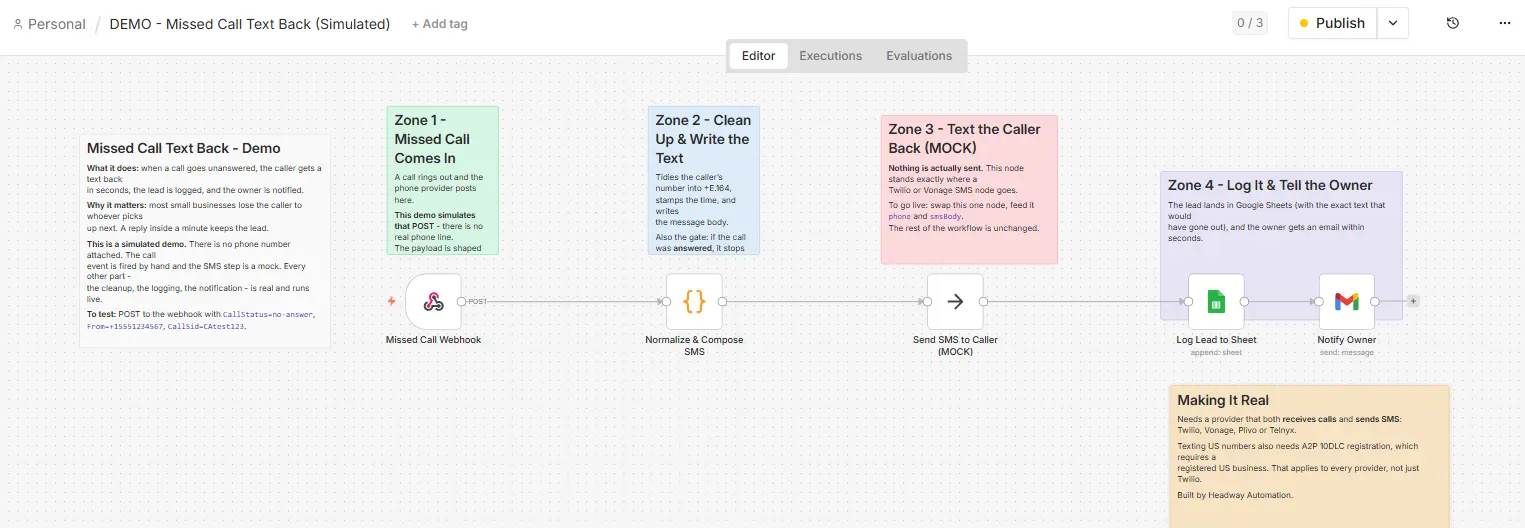
It is five nodes.
- A webhook receives the inbound call event.
- A code node normalises the caller’s number and composes the message body. This is also where answered calls are dropped: for an answered call the node returns nothing at all, so the rest of the workflow simply never runs. There is no separate gate node, which is worth saying because it is a cleaner pattern than adding an IF branch.
- A placeholder node stands in for the SMS send.
- A Google Sheets node appends the row: timestamp, caller number, call status, message.
- A Gmail node notifies the owner.
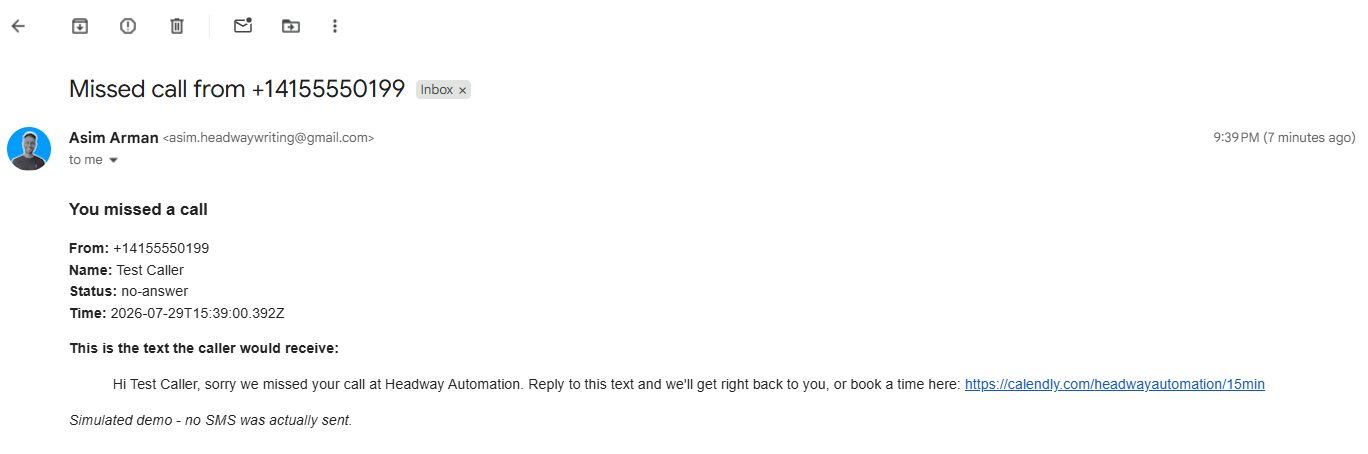
Two details in those screenshots are worth pointing out, because they are the fixes for bugs described in the next section, and you can see them rather than take my word for it.
The Sheets node has its cell format set to RAW. The Gmail node references its source node explicitly by name rather than relying on whatever the previous node happened to output. Both of those exist because something broke.
Full transparency on what this build is and is not. It was tested using a simulated call event and a mock SMS step. There is no Twilio account connected, no live phone number, and no text message was ever actually sent to anybody.
The workflow is named DEMO and the placeholder node is named MOCK, both visible in the screenshots. This is a demonstration build, not a client deployment, and I am not going to present it as one.
What nobody tells you before you set this up
These only surface once you actually build one and try to break it, which is why they appear in almost no published guide.
- Personal voicemails leak into the business system. If your business number is a forwarded mobile, personal calls that hit voicemail trigger the workflow too. Filter by the platform-registered number in your trigger, not by call status alone.
- The infinite forwarding loop. If the platform’s number also has forwarding enabled, easy to do by accident, calls bounce between the two until the carrier drops them. Audit your forwarding settings before going live.
- Unregistered texts get filtered. Without 10DLC registration your messages are blocked before delivery. The workflow fires, returns a green tick, and nothing arrives.
- Robotic-sounding messages. A merge field that fails leaves your caller reading “Hi , I missed your call.” Test every merge field against a real contact record before going live.
And one open question.
If a caller hangs up after a ring or two, before the call is forwarded at all, does anything fire? This was raised in a GoHighLevel community thread and went unanswered by the commenters, by the vendor documentation, and by every guide we could find, including the ones ranking at the top of Google for this topic.
We could not find a documented answer either, and our own build cannot test it because it has no live number attached. So test it on your own setup before you trust it.
Call your number, hang up after one ring, and check whether anything happened. If nothing did, you now know the exact shape of the gap in your system, which is more than any published guide currently offers.
Four bugs, and every one showed a green tick
This is the part that changed how I think about automation. Our build had four separate faults. Every single one reported success in n8n while being completely broken.
- The Sheets tab was named Untitled. Creating a spreadsheet by uploading CSV content names the file correctly but leaves the tab called Untitled, so the node could not find the sheet it was looking for. The fix was to stop guessing after two failed attempts and read the workbook file directly to get the real name.
- Google Sheets ate the plus sign off phone numbers. A number stored with a leading plus came back without it, because Sheets reads a leading plus as the start of a formula and silently converts the cell to a number. The fix is setting the cell format to RAW.
- The owner notification email arrived completely blank. Subject line read “Missed call from” with no number, every field empty, execution status: success.
The Gmail node sat after the Sheets node, so it was reading the spreadsheet’s output columns rather than the code node’s fields, and unknown fields render as empty strings instead of throwing an error. The fix is naming the source node explicitly. - A row silently vanished. Two missed calls fired milliseconds apart, both executions reported success, and only one row landed. Both runs had claimed the same next-empty row and the second overwrote the first.
That one is documented rather than fixed, because for a demo it is an acceptable ceiling. In production you would use a real database or cap concurrency.
The lesson generalises well beyond n8n.
A green tick means the node ran. It does not mean the outcome was correct. Every one of these passed as a success, and the only reason any of them were caught was opening the actual spreadsheet and reading the actual email.
Which brings us to the part most guides skip entirely.
Metrics that show whether it is actually working
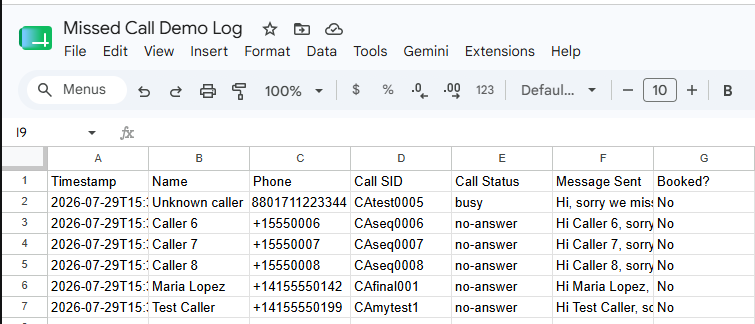
You cannot know your setup works without measuring it, and almost nobody does. Five numbers tell you whether your missed call text back is earning its keep or failing quietly.
| Metric | What it means | What to watch for |
|---|---|---|
| Send rate | Share of missed calls that triggered a text | This catches infrastructure failures. A drop here means a trigger or filtering problem. |
| Reply rate | Share of sent texts that got a reply | This catches messaging failures. If it is low, the wording is the problem, not the system. |
| Recovery rate | Share of missed calls that became a booked job or callback | The number your finance brain actually cares about. |
| Call-to-booking rate | Share of recovered conversations that became paid work | Compare it against your normal close rate. |
| Response time | Median seconds from missed call to delivered text | Reply intent falls off sharply after the first few minutes. |
Set your own targets rather than chasing an industry benchmark, and track all five weekly. Each one catches a different kind of failure, and watching only one will mislead you: a perfect reply rate is meaningless if your send rate has quietly collapsed. Without all five, you are running the system on faith rather than evidence.
Missed call text back versus AI voice agents
A text message is a promise to continue a conversation. For a plumber quoting a straightforward job, that promise is usually enough. The caller replies, you confirm a time, done.
But a text-back cannot qualify a lead, capture job details, ask where the property is, or put an appointment in your calendar. Past a certain call volume it creates a new bottleneck rather than removing one: you are now managing ten simultaneous text threads instead of ten missed calls.
The natural next step is an AI voice agent that answers in real time, asks the qualifying questions and books the slot. At that point missed call text back becomes the fallback for calls the voice agent could not handle, rather than your primary recovery mechanism. Most trades businesses do not need that yet. The ones booking out weeks ahead usually do.
Frequently asked questions
What is the missed call text back feature?
It is an automated system that texts any caller whose call went unanswered, triggered by a no-answer, busy or voicemail state, so the caller has a reason to stay in conversation rather than dialling a competitor.
Do I need a new number for missed call text back?
No. Your existing business number stays unchanged. A second local number is registered inside your automation platform and receives the forwarded calls. Your customers still dial the number they always have.
How do I set up missed call text back in GoHighLevel?
The quick route is enabling it in your phone number settings and writing a single message. The full route is building a workflow using a call-status trigger filtered to missed, busy and no-answer, then adding an SMS action. The workflow route is what gives you branching and logging.
What should a missed call text say?
Under 160 characters. Your business name, an acknowledgement of the call, and one clear next step, which should be a reply prompt rather than a link. Use the four-part structure above.
Can text messages be sent automatically, and how fast?
Yes. In a properly configured workflow delivery happens within seconds of the call ending. Our own measured build ran the full path in 2.6 seconds. Note that the iPhone auto-reply-while-driving setting is a personal convenience feature, not a business-grade system: it does not log anything, cannot be customised per caller, and gives you nothing to measure.
The short version
- Missed call text back sends an automatic SMS the moment a call goes unanswered, triggered by busy, no-answer or voicemail states, giving you a second chance before the caller finds someone else.
- You do not need to change your number. Conditional call forwarding at the carrier level keeps everything as it is and only activates when a call is genuinely missed.
- The native toggle is fine for simple setups. A workflow builder is what you need for business-hours branching, CRM movement, and the logging that tells you whether any of it is working.
- Measure it, or you are guessing. A green tick means the node ran, not that the customer got the message.
Ready to stop losing leads at the phone?
Missed call text back is the fastest single automation a trades business can put in place.
But a toggle is not a strategy. The businesses that consistently turn missed calls into booked jobs are the ones who built the whole thing properly: the right trigger, the right message, a follow-up sequence behind it, and a log they actually read every week.
Pingback: How to Stop Losing Leads: 7 Leaks Costing You Money