

Workflow automation benefits show up fast: teams get time back, make fewer mistakes, and cut costs without adding headcount, all by letting software run the repetitive parts of a task. Here are the core benefits of work automation:
- Time back. Replies, reminders, and data entry run on their own, so your team’s hours go to work that needs a person.
- Fewer mistakes. The same steps run the same way every time, so nothing gets forgotten or mistyped.
- Lower costs, growth without extra hires. Software handles the repetitive steps, like sending a reply, booking a slot, or routing a request, so you can take on more work without adding headcount.
That gap is where the benefits show up first, and small teams feel it more than anyone.
Small teams feel the cost of manual work more than anyone. There is no operations department to catch what slips. The owner is the operations department. Every task done by hand can be forgotten, done late, or done wrong.
This guide covers six workflow automation benefits and what each one looks like in a small business. Three come with workflows I built myself.
If you want the wider picture first, start with how workflow automation fits across a small business.
What Are the Benefits of Workflow Automation? Time Back, Fewer Mistakes, Lower Costs
Six benefits matter most to a small business. Here they are side by side, with a way to measure each one.
| Benefit | What it looks like in a 10-person business | How to measure it |
|---|---|---|
| Time back | Confirmations, reminders and lead notes send themselves | Hours per week spent on the task, before and after |
| Faster replies | New enquiries get an answer in seconds, not the next morning | Minutes between the enquiry and the first reply |
| Fewer mistakes | Every request follows the same steps, so nothing gets skipped | Errors or missed steps per month |
| Lower costs | Fewer paid hours go to repetitive tasks | Hours saved multiplied by hourly cost |
| Growth without hiring | Volume doubles without a new admin hire | Enquiries handled per person |
| Visibility | Every request leaves a record you can check | Share of requests logged and closed |
The sections below take them one at a time.
Automation Benefits Start With Time You Get Back
The first thing you notice is time.
Small tasks that used to interrupt your day simply stop needing you.
Salesforce reports that 74% of employees get anywhere from four to 28 hours a week back from automation, just by handing off tedious tasks.
Picture a small salon or a plumbing office. Someone spends 20 minutes a day texting to confirm and rearrange appointments. That is more than an hour and a half every week on one small task, and it’s the kind of work that never shows up on a to-do list.
I built a booking flow for a demo business to see how this works in practice. A customer asks for a time.
The workflow checks the calendar and offers the open slots. When the customer clicks one, it checks that the slot is still free, books it, and sends a confirmation.
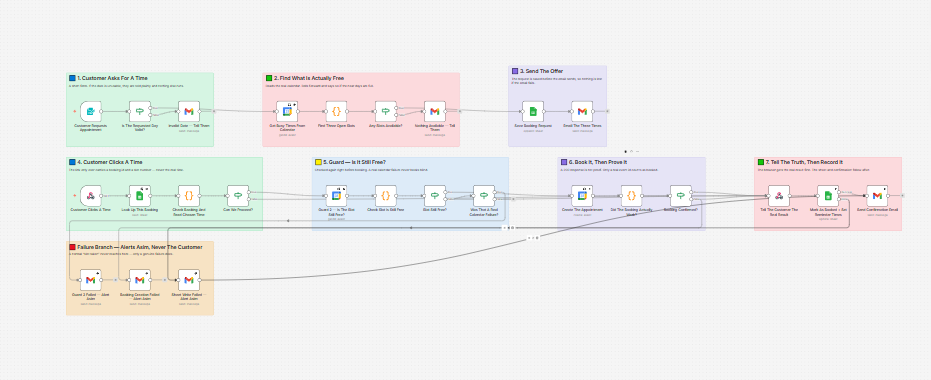
The step I like most is the guard.
If two people click the same slot, only one gets it, and the other is told the truth. If anything fails, the workflow alerts me and never the customer.
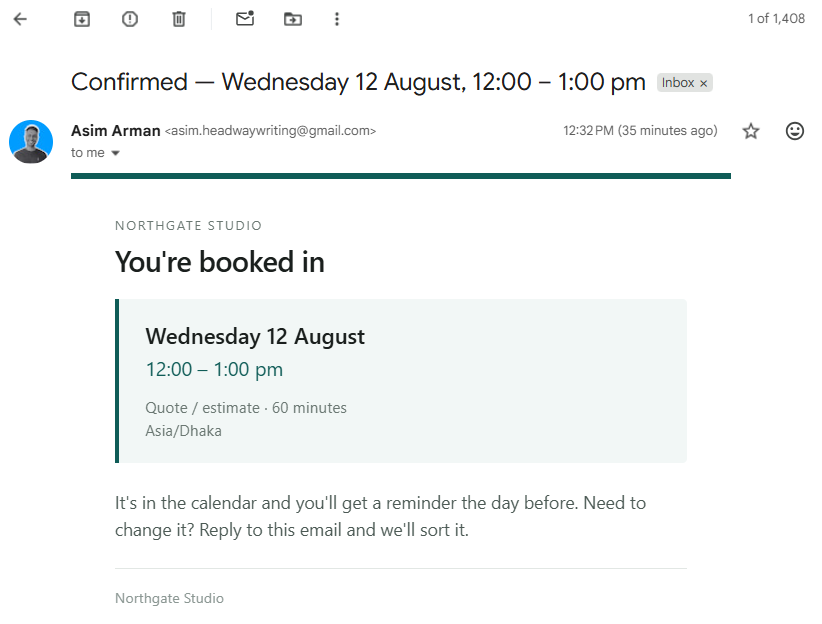
I haven’t measured how many hours it saves. So I won’t give you a number. You can find your own by timing the task for one week before you automate it.
Faster Replies Are One of the Biggest Benefits of Automation in Business
Speed decides who gets the job.
A fast reply tells a customer they’ve been heard, and a slow one gives them time to try someone else.
My Speed-to-Lead workflow, built as an HVAC demo, starts the moment a form is submitted. It scores the lead with Claude, writes a short reply in plain language, and sends it by Gmail. Hot leads go down a priority branch.
Every lead is logged in Airtable and Google Sheets, and I get a short brief by email.
Follow-ups at day two and day five are built in, and they stop as soon as the lead books. They’re switched off by default, so each client decides when to turn them on.
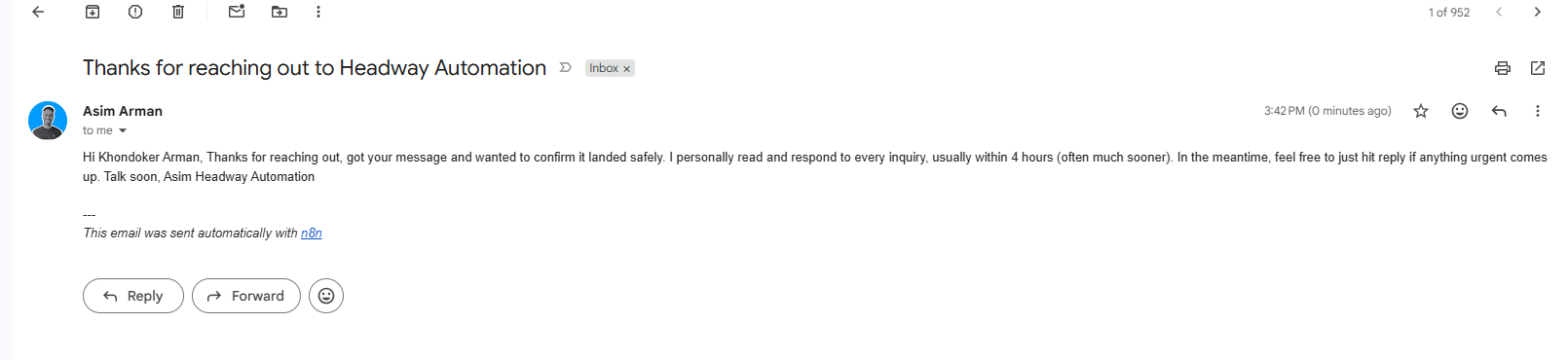
The email above is the automatic reply from a test submission. What it shows is the mechanism. A person won’t reply at 6 p.m. every single day. A workflow will.
A good automatic reply does three things. It confirms the message arrived. It says when a person will follow up. It offers a next step, like a booking link.
It shouldn’t pretend to be a person, and it shouldn’t be one of twelve. One well-timed message beats a long sequence, and badly done automation trains customers to ignore you.
Fewer Mistakes and Other Quiet Process Automation Benefits
Automation runs each task the same way every time, so steps don’t get skipped.
Mistakes in manual work are quiet. A request sits in someone’s inbox. A record never gets updated.
An approval goes to the wrong person. Nobody notices until it costs something.
Mistakes usually hide in handoffs.
A form goes to an inbox. The inbox goes to a spreadsheet. The spreadsheet goes to an invoice.
Each handoff is a place where something gets retyped, missed, or sent to the wrong person.
Automation removes the handoff by passing the data along itself.
I built a demo expense approval workflow to show the fix. A request comes in and goes to Slack with approve and reject options.
The requester gets an email with the decision. Every request is written to a log.
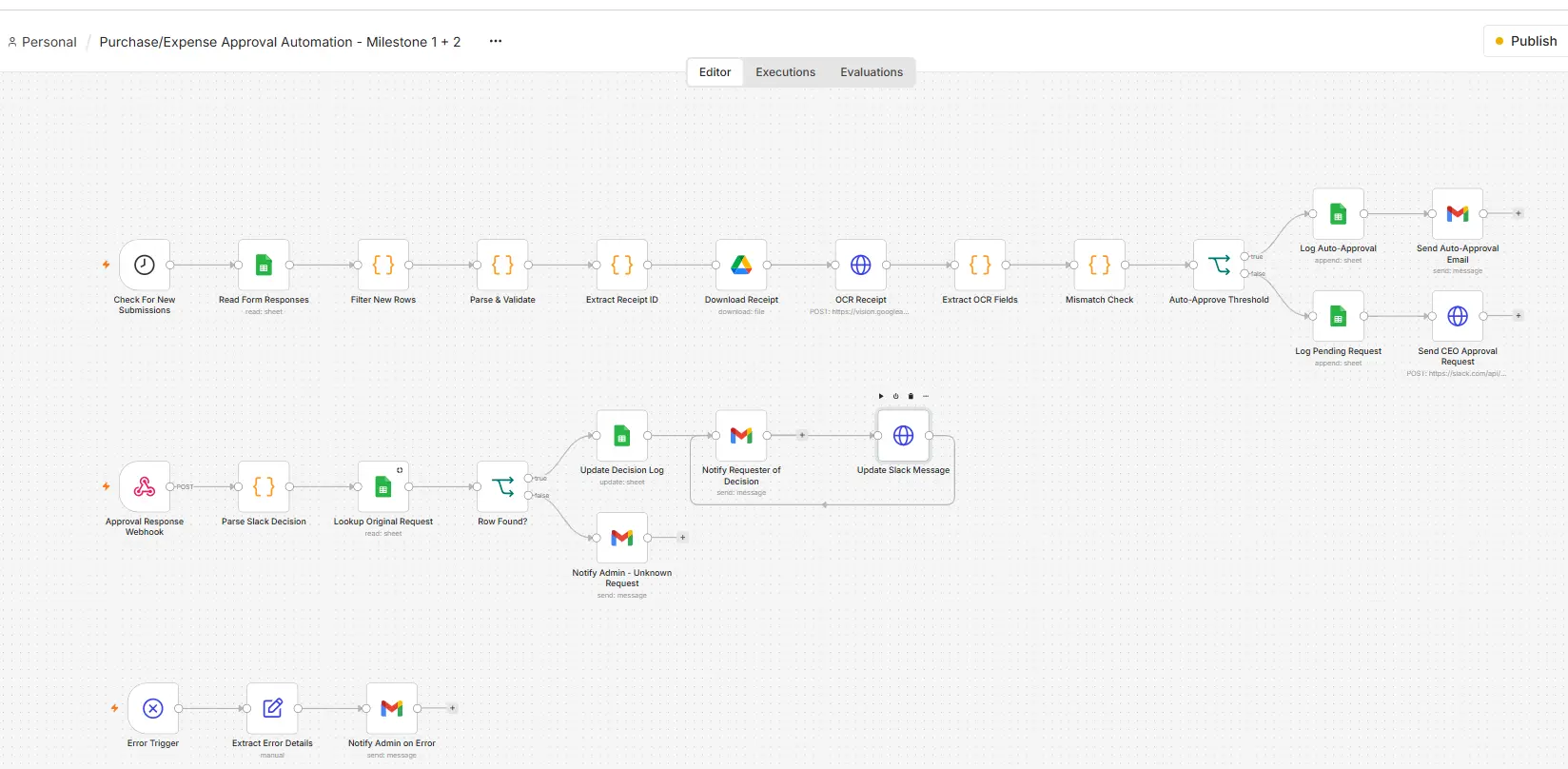
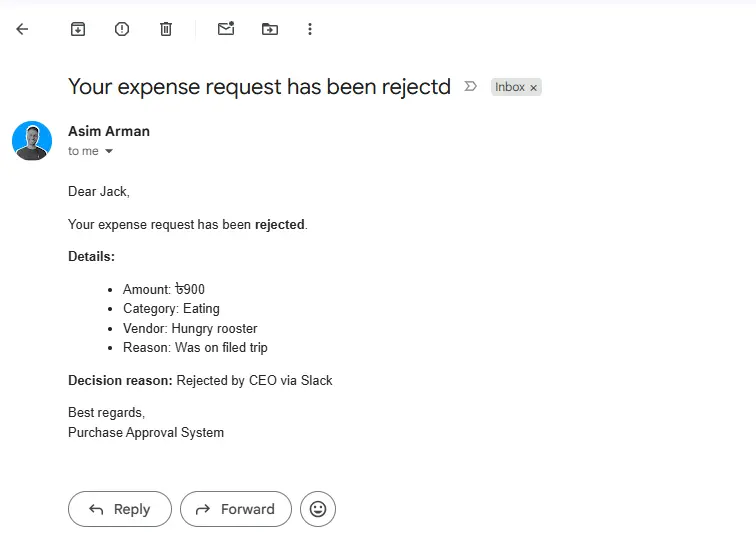
Nothing depends on someone remembering.
The steps happen in the same order whether it’s Monday morning or Friday at 5 p.m. That is one of the quieter process automation benefits, and it’s easy to overlook.
Lower Costs and the Benefits of Process Automation
Costs fall because fewer paid hours go to repetitive work.
Here is a simple way to work it out. Take the hours a task takes each week. Multiply by what an hour of that person’s time costs.
Say a task takes five hours a week and an hour costs $40. That is $200 a week, or more than $10,000 a year. This is an example, not my data, so use your own numbers.
The savings usually come from three places. There are fewer admin hours. There is less time spent fixing mistakes. And there are fewer lost enquiries, which is revenue rather than cost, so it’s easy to leave out of the sum.
Larger companies report similar gains. In a 2020 Salesforce report, 59% of IT and engineering leaders said process automation had reduced costs on their teams by 11% to 30%.
Those are bigger organizations, so treat the range as a rough guide.
Count the cost of automation too. You pay for the tool, either as a subscription or as hosting, and for the time to build it.
The benefits of process automation are real, but only when the savings are bigger than that cost.
Growing Without Hiring More People
Automation lets the same team handle more work.
If you get 20 enquiries a week, replying by hand is fine. At 100, it starts to break. A workflow handles 100 the same way it handles 20.
The benefits of automation of processes show up most when volume rises, because the effort stays flat.
Watch for the signs that you’ve hit the edge. Replies start to slip. Someone stays late to catch up.
You turn down work because nobody has time to handle it. Those are the tasks to automate first.
This doesn’t remove the need for people. It changes what your next hire is for. Instead of another person to send confirmations, you hire for work that needs judgment.
Visibility Into What Is Actually Happening
Automated workflows leave a record, so you can see where every request stands.
My Speed-to-Lead demo writes every lead to Airtable and a Google Sheet. The approval demo writes every decision to a log. That means a stuck request shows up as a row with no answer, instead of a complaint from a customer.
Three columns are enough for a simple log.
Record when the request arrived, what happened, and when it closed. Spend five minutes a week scanning for rows with no close date.
Without a record, you find problems when someone tells you about them. With one, you find them first.
Benefits of Automated Workflow and Where They Stop
Automation doesn’t fix a broken process, and it isn’t worth building for everything. The benefits of automated workflow setups only show up when the process underneath is sound.
- A messy process. If the steps aren’t clear, automating them just produces the mess faster. Write the steps down first.
- A rare task. If it happens twice a year, do it by hand.
- Human moments. A complaint or a sensitive conversation needs a person, not a template.
- A process that keeps changing. Every change means rework on the workflow.
- A message that sounds robotic. If customers can tell it’s automated and cold, they’ll ignore it. Keep it short and human.
A simple test helps. If building the workflow will take longer than the hours it saves in a year, wait.
Will Workflow Automation Replace Your Team?
No. It takes over repetitive steps, not judgment and not relationships.
Salesforce reports that 89% of full-time workers are more satisfied with their job because of automation. It also reports that 95% of IT and engineering leaders say their organizations are prioritizing workflow automation.
The people on your team likely know which tasks they dislike. Start there. Automating those tasks gives them time back for the work only they can do.
How to Tell Your Automation Is Paying Off
Compare the same three numbers before and after. Those are hours spent on the task, time to the first reply, and mistakes caught.
Write them down before you build anything. A notes app or a spreadsheet is enough. Check them again after a month. This is also how you check the benefits of automating processes in your own business, rather than taking anyone’s word for it.
If nothing moved, the problem is usually the process, not the tool. Go back to the steps and look for the one that still depends on a person remembering.
Frequently Asked Questions About Workflow Automation Benefits
What are the benefits of automation?
The main workflow automation benefits are time back, faster replies, fewer mistakes, lower costs, growth without extra hires, and clear records. Which one matters most depends on where your business loses time today. Start with the task that eats the most hours.
Is workflow automation worth it for a very small business?
Yes, if a repetitive task costs you real hours each week. If it doesn’t, wait until it does.
How long does it take to see the benefits?
A simple workflow can show a result within a few weeks, because you can compare before and after. Larger ones take longer to build and longer to judge.
Do I need to know how to code?
Not always. Tools like n8n use a visual canvas, so you connect steps instead of writing code. Complex builds are still easier with someone who has done them before.
Can you give me an example of workflow automation?
A form submission that triggers an instant reply, logs the lead in a sheet, and follows up if the lead hasn’t booked. That is the Speed-to-Lead build above.
Where to Start
Pick one task you do every week. Time it for a week. Then check whether it follows the same steps each time. If it does, it’s a good first workflow.
Good first candidates are confirmations, reminders, lead replies and status updates. They repeat, they follow clear steps, and a mistake costs little.
These workflow automation benefits only show up once the first workflow is actually running. If you’d rather have someone build it, get in touch through the contact page.