
By Asim Arman – I build n8n automation systems for HVAC and trade businesses at Headway Automation.
Published: June 2026
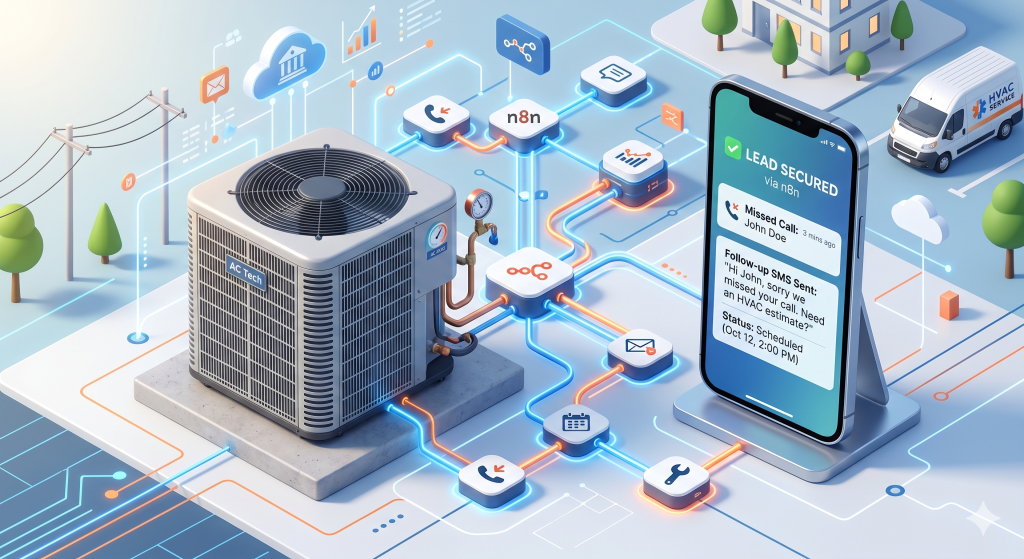
HVAC companies automate lead follow-up with n8n by connecting an AI voice receptionist, a speed-to-lead response system, missed-call text-backs, estimate follow-up sequences, and post-job review requests into one workflow.
Each automation covers a specific moment where leads are won or lost, the unanswered phone call, the form that sits in an inbox, the estimate that never got a follow-up, the completed job that never asked for a review.
We built this exact system for real HVAC companies at Headway Automation. Here is how every piece works and how they connect.
Why a Missed HVAC Call Costs More Than You Think
A missed HVAC call rarely costs you just one job. It costs you the repair, the follow-on estimate, the maintenance plan, and every referral that customer would have sent. One unanswered ring can quietly wipe out thousands in future revenue before you even realise the lead is gone.
That is why the most effective HVAC automation software focuses on response speed first. Not better marketing. Not more leads. Faster handling of the leads already coming in.
What Is HVAC Lead Follow-Up Automation?
Automated follow-up for HVAC is a connected system that responds to leads, missed calls, estimate requests, and completed jobs without anyone on your team having to trigger it manually. Every customer event- a form fill, a missed ring, a sent quote, a finished job- creates an automatic next step.
The goal is simple. No lead sits in a void for hours. No estimate goes cold because nobody remembered to follow up. No completed job skips a review request. The system handles the routine, so your team can handle the exceptions.
With n8n HVAC workflow setups, you can connect your phone system, CRM, dispatch software, email, and SMS tools into one automation layer. Nothing gets rebuilt. Everything already in use just starts working together.
The 6 Automations Every HVAC Business Needs Running
Most HVAC companies do not need a hundred workflows. They need a small, reliable set that covers the moments where revenue is most at risk.
1. Missed-Call Text-Back: Your Fastest Win
The HVAC missed call follow-up is the simplest automation with the biggest immediate impact. The moment a call goes unanswered, the system sends a branded SMS to the caller within seconds. It tells them the company got their call and invites them to reply by text. No voicemail. No hold music. Just an instant acknowledgment.
For a homeowner with a broken AC unit, that text is the difference between staying in the conversation and calling the next result on Google. The response goes out before your competitor even sees the missed call notification.
- Detects unanswered inbound calls automatically
- Sends a branded reply within seconds
- Routes urgent leads to the right team member immediately
2. Automated Estimate Follow-Up: Stop Letting Quotes Go Cold
Sending an estimate and then going quiet is one of the most expensive habits in HVAC sales. The customer got your price, saw your competitor’s price, and made a decision without you ever following up. An automated SMS follow-up for HVAC estimate sequences changes that.
A structured follow-up keeps the opportunity warm across several days. It reminds the customer of the problem they need solved, answers common concerns without them having to ask, and gives a clear path to book or ask questions. Done right, it feels helpful, not pushy.
- Triggers automatically when an estimate is sent or marked delivered
- Runs timed SMS and email follow-ups without manual input
- Pauses automatically when the customer replies or books
3. Seasonal Maintenance Campaigns: Create Demand Before the Rush
Most HVAC companies fill their schedule reactively. Seasonal maintenance campaigns let you get ahead of it. Before the cooling season or the heating season hits, the system reaches past customers with tune-up reminders, so you are booking appointments before the calendar gets buried.
This also puts your team in front of the customer before a breakdown forces an emergency call. Technicians who show up for a tune-up find repair and replacement opportunities. That is revenue that would have gone to whoever responded to the emergency.
- Segments customers by service history and last appointment date
- Sends spring and fall reminders automatically
- Books maintenance slots before peak demand overloads the schedule
4. Maintenance Plan Renewals: Protect Your Recurring Revenue
Recurring revenue from maintenance plans is some of the most valuable revenue in HVAC. It is also the revenue most likely to disappear quietly when nobody follows up on renewals. Automation keeps that from happening.
The renewal conversation starts before the plan expires. The customer gets a reminder, a clear option to renew, and a simple next step. High-value accounts that do not respond get flagged for a personal call from your team.
- Sends renewal reminders before expiration
- Delivers payment links or renewal prompts automatically
- Flags priority accounts for manual outreach when needed
5. Post-Job Review Requests: Build Visibility While It Is Still Fresh
The best time to ask for a review is when the job is fresh, and the customer still remembers exactly how smooth it went. Wait too long and response rates drop. Never ask and you miss one of the most reliable ways to grow local visibility.
HVAC sales automation handles this without your team remembering to send anything. The request goes out at the right moment. Customers who respond unhappily get routed to an internal follow-up instead of a public review site.
- Triggers automatically after job completion
- Sends review requests by SMS or email based on your timing preference
- Routes negative responses to internal follow-up, not public platforms
6. Smart Lead Routing and Pre-Qualification: Stop Treating Every Lead the Same
Not every inbound inquiry deserves the same response path. An emergency HVAC call needs an immediate dispatch alert. A replacement quote request needs a salesperson. A warranty question needs the service team. A lead outside your service area needs a polite redirect.
Smart routing with lead capture HVAC workflows tags each lead on arrival, assigns it to the right person, and routes it through the right process. Hot leads get to dispatch immediately. Weak or mismatched inquiries get filtered out before they waste anyone’s time.
- Assigns leads by job type, geography, urgency, and source
- Sends high-priority leads directly to dispatch or sales
- Filters out low-fit inquiries before they clog the pipeline
The 5-Touch Estimate Follow-Up Sequence
Sending one estimate and waiting is not a sales process. It is hope. A structured five-touch sequence gives every quoted lead a clear path forward and keeps your company in the conversation across the full decision window.
| Day | Channel | Goal |
|---|---|---|
| Day 0 | SMS | Confirm the estimate was received and invite a quick reply. |
| Day 1 | Restate the recommendation, the benefits, and the next step to book. | |
| Day 3 | SMS | Reduce friction with a short check-in and a simple yes/no question. |
| Day 5 | Call | Surface objections, financing concerns, or timing issues. |
| Day 7 | Email or SMS | Create soft urgency and offer one final easy booking path. |
Pro Tip: When the sequence is built in n8n, a customer reply or booking action can pause all future touches automatically. The lead who says “yes” on Day 1 never gets a Day 3 nudge. That matters more than most people realise, because nothing kills trust faster than following up with someone who already booked.
CRM vs. Field Service Management: Which One Does What
Many HVAC owners use these terms interchangeably, but they solve different problems. Getting clear on the difference is the first step to building automation that actually works. FSM tools like Jobber and ServiceTitan run your field operation. CRM tools like GoHighLevel handle lead nurture and sales follow-up. They are built for different jobs.
| Feature | FSM (e.g. Jobber, ServiceTitan) | CRM (e.g. GoHighLevel) |
|---|---|---|
| Dispatch and scheduling | Built for technician calendars, routes, and job assignments. | Usually not the core strength. |
| Job status tracking | Strong for work orders, invoices, and service stages. | Often secondary or custom. |
| Sales follow-up | More limited for nurture logic. | Strong for pipeline follow-up and sales automation. |
| SMS and email sequences | Possible, but often less flexible. | A primary use case. |
| Pipeline visibility | Focused on job execution. | Focused on leads and conversion stages. |
| Best role | Running the service operation. | Converting inquiries into booked jobs. |
HVAC CRM integration through n8n is what makes both systems work together. The FSM runs your field operation. The CRM manages lead nurture and communication. n8n passes events between them so the two stay in sync without anyone having to manually update both.
Case Study: How Arctic Breeze HVAC Built a Full Lead System with n8n
Arctic Breeze HVAC had a problem that most trade businesses recognise. Leads were coming in from phone calls, web forms, and paid ads, but follow-up was inconsistent. Callbacks happened when someone remembered. Estimate reminders depended on whoever was least busy that day. Review requests were an afterthought.
During peak weeks, the gaps got wider. More calls came in, more leads sat untouched, and more jobs quietly went to competitors. I built an automation system for them using n8n that covered both channels where leads were slipping through.
The Problem Before Automation
Three gaps were eating revenue. Missed calls sat too long before anyone replied. Sent estimates had no standard follow-up, so warm leads went cold after one email. Completed jobs did not reliably trigger review requests or maintenance plan renewal conversations.
The result was predictable. Slower response, lower conversion on warm opportunities, and lost revenue that never showed up as a visible line on any report.
The System They Built
I connected the company’s phone system, CRM, and service software using n8n and built two core automations that covered both inbound channels.
Channel one: the AI voice receptionist. I built a 24/7 AI phone agent using Vapi for voice handling, GPT-4o as the conversation brain, and ElevenLabs for voice quality, all coordinated through five n8n backend workflows. The agent answers every inbound call around the clock. It checks the CRM in real time to recognise returning customers, looks up live calendar availability in Google Calendar, and books or cancels appointments directly without any human in the loop.
When a caller mentions no heat or a gas smell, the system detects the emergency and escalates immediately to the on-call technician. Every call is logged automatically with a full transcript and outcome. After every call, a GPT-4o quality layer re-reviews the conversation, scores it on an HVAC service rubric, and flags weak calls for review. Most AI phone agents have no quality control after they go live. This one grades itself.
You can check the video out where I am talking to the automation:
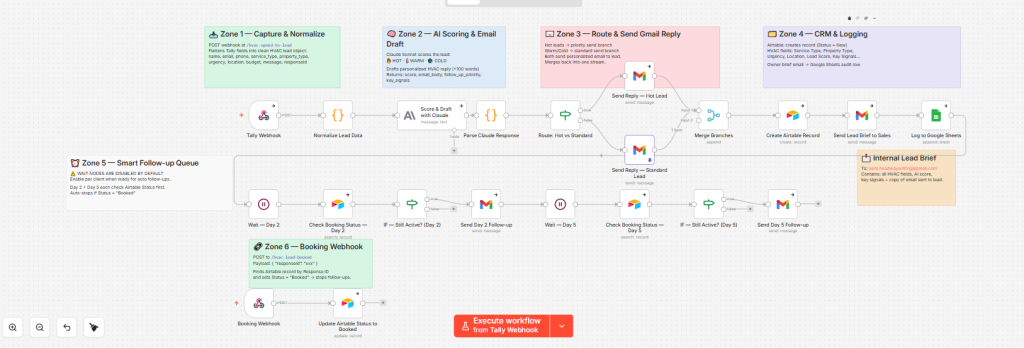
Channel two: the speed-to-lead system. Web form submissions run through a separate n8n workflow.
The moment a lead submits a form, n8n normalises the data and passes it to Claude Sonnet, which reads the lead and scores it as HOT, WARM, or COLD based on urgency signals, details provided, and contact information.
A personalised reply email goes out within seconds, written by Claude based on the lead’s score and situation, not a generic template. The lead record is created in Airtable with the full profile and AI score. The sales inbox gets an internal brief with an emoji temperature tag and Claude’s reasoning. If the lead is not booked by Day 2, a follow-up fires automatically. If still not booked by Day 5, a final touch goes out. The moment the lead books, a webhook flips the Airtable status and the sequence stops.
Together, these covered both channels where HVAC leads arrive: the phone call that goes to voicemail and the web form that sits in an inbox until Monday.
The Results
After the workflows were in place, Arctic Breeze HVAC went from a multi-hour average first response time to replies landing within seconds on both channels. Follow-up inconsistency dropped because the system ran the same way every day regardless of how busy the team was. Staff spent less time chasing routine tasks and more time on active opportunities and live customer issues.
Key takeaway: Faster first response and consistent follow-up are the two biggest gains in any HVAC automation rollout. The third is automated review generation, because that one compounds over time.
The DIY Tech Stack: Connecting Your Tools Without Replacing Them
Small business automation for trades does not require starting over with new software. The recipe is a trigger, an automation layer, a messaging tool, and a destination system. That is it.
Here is how the logic flows in a typical n8n HVAC workflow:
- A customer event happens: missed call, form submission, estimate sent, or job marked complete.
- n8n receives the trigger from your phone system, CRM, FSM, or web form.
- The workflow checks conditions: service area, lead source, job type, urgency score.
- It sends the right message through SMS or email.
- It updates the CRM, alerts a team member, or schedules the next follow-up step.
- When the customer replies, books, or opts out, the workflow changes path automatically.
Insider Tip: When I build for HVAC companies, I start with the missed-call text-back and the estimate follow-up sequence. These two alone recover more lost revenue than any other automation in the stack. Everything else builds on top once those are running.
What Nobody Tells You About HVAC Automation
Automation looks straightforward in any demo. The demo always ends right after the first message sends. Real production environments are different, and the issues that matter most almost never come up in a sales conversation.
SMS Compliance Will Break Your Workflow If You Ignore It
Businesses sending automated SMS at scale need to be registered under A2P 10DLC rules. Without proper setup, your text messages can get filtered, delayed, or blocked by carriers, silently, with no error notification in your automation dashboard.
Warning: A blocked SMS workflow does not fail loudly. It just stops working. Your missed-call text-back looks like it is running fine, but the messages are never arriving. If your HVAC follow-up depends on SMS, A2P compliance is not optional.
This matters most for estimate reminders, missed-call text-backs, and review requests because those are the exact messages that drive revenue recovery.
The Vapi Tool Response Format That Breaks Everything Quietly
If you are building an HVAC AI voice agent with Vapi, every n8n webhook that responds to a Vapi tool call must return a very specific response structure:
json
{ "results": [{ "toolCallId": "<id>", "result": "<stringified payload>" }] }A plain JSON response makes Vapi silently treat the tool call as failed. The AI continues the conversation normally but never actually books the appointment. No error gets logged. No alert fires. The caller hangs up thinking they are booked, and they are not. I found this exact issue during live testing on the Arctic Breeze build. It took real call traffic to surface it — not a sandbox, not a demo. This is the kind of thing that never shows up in a tutorial.
Automated Messages That Sound Like Automation Get Ignored
The second hidden problem is message quality. Generic wording, repeated templates, and poor timing make recipients ignore outreach, especially when they do not remember exactly why the company is texting them. Volume does not fix this. Personalisation does.
Best Practice: Reference the reason for contact in every automated message. A text that says “Hi, we saw you reached out about your AC unit” performs significantly better than “Hi, we noticed a missed call.” Context is what keeps automation from feeling like spam.
3 Mistakes That Kill HVAC Follow-Up Automation
Triggering too late. If the first response goes out hours after the inquiry, many leads are already gone. Automation only works if the response speed is faster than a human competitor picking up the phone.
Sending the same sequence to everyone. Emergency service calls, replacement quotes, seasonal tune-ups, and warranty questions are different conversations. Routing them all through identical messaging is how you burn warm leads with the wrong tone at the wrong time.
Ignoring reply handling. Automation fails the moment a customer replies, and nothing routes that reply to a human. Unanswered replies destroy trust faster than a slow initial response.
Stop Losing Jobs to a Gap Your Competitors Are Already Closing
HVAC companies do not lose leads because of bad marketing. They lose them because the handoff after the lead arrives is too slow, too manual, and too easy to forget during a busy week.
A well-built HVAC sales automation system closes that gap permanently. Missed calls get a text back in seconds. Sent estimates run a full follow-up sequence without anyone managing it. Completed jobs generate review requests on schedule. Maintenance plans renew because the conversation starts before the expiration date.
I built exactly this system for Arctic Breeze HVAC using n8n, and it covers both channels where leads arrive: the phone call that used to go to voicemail, and the web form that used to sit in an inbox until someone had time. If missed calls or slow form follow-up are costing you jobs, book a call with me and I will map out what this system looks like for your business. You can also find me on LinkedIn if you want to see the builds before you reach out.
The leads are already coming in. The only question is whether your system is fast enough to catch them.
Frequently Asked Questions
How fast should an HVAC company follow up with a new lead?
Within minutes, not hours. The biggest conversion gains in automation almost always come from compressing response time right at the point of first inquiry.
What is a missed-call text-back for HVAC?
It is an automatic SMS sent within seconds after an inbound call goes unanswered. It tells the caller the company received their inquiry and gives them an easy way to continue the conversation by text.
Can n8n connect an HVAC CRM and dispatch software?
Yes. n8n acts as the coordination layer between separate systems, which is exactly why it works well for businesses that already use different tools for operations and sales.
Do HVAC companies need both a CRM and field service management platform?
Most do. The FSM handles field operations, scheduling, and job tracking. The CRM handles lead nurture, communication sequences, and conversion workflows. n8n connects the two so events in one system trigger the right action in the other.
What should happen after an HVAC estimate is sent?
A timed multi-touch sequence should start immediately, using SMS, email, and planned call steps to keep the lead warm and move it toward booking. The sequence should stop the moment the customer books automatically.
How long does it take to set up HVAC lead follow-up automation?
A basic missed-call text-back and estimate follow-up sequence can be live in a few days once your tools are connected. A full system covering call handling, lead scoring, routing, review requests, and renewals typically takes two to three weeks to build, test, and tune against real traffic.
Asim Arman is a CXL-certified conversion optimizer and n8n automation builder at Headway Automation. He writes SEO content professionally at VISER X and builds every system he writes about. More about Asim · LinkedIn